
Solved

unable to check asset-need to have a status of 'In Service' to be checked in

  • October 4, 2023
  • 6 replies
  • 177 views

Forum|alt.badge.img+1

Unable to check in assetAsset [ Acer Spin 514 - G111345095 ] is not currently checked out - Assets need to have a status of 'In Service' to be checked in


How do i check in without it being in service ?  New Chromebooks for example, or reasigning them. I need to know how to set those permissions. 

Best answer by NBurke_iiQ

@FMullen 6130352 longwoodcsd  assets have to be in the IN SERVICE status to be checked in and they also have to be checked out to someone as well.  Checked in essentially means unassigning an asset from an owner.  If you are trying to put your devices in a storage location, consider using Rollout Scout Batch Check In.  You can also use custom ticket statuses if you are looking to organize your assets in another way.

6 replies

NBurke_iiQ
Forum|alt.badge.img+7
  • Employee
  • Answer
  • October 9, 2023

@FMullen 6130352 longwoodcsd  assets have to be in the IN SERVICE status to be checked in and they also have to be checked out to someone as well.  Checked in essentially means unassigning an asset from an owner.  If you are trying to put your devices in a storage location, consider using Rollout Scout Batch Check In.  You can also use custom ticket statuses if you are looking to organize your assets in another way.


Hannah Bailey
Forum|alt.badge.img+18
  • iiQ Community Manager
  • October 9, 2023

Thanks @NBurke_iiQ 


@FMullen 6130352 longwoodcsd  Here is the knowledge base guides around creating custom Asset Statuses. 

https://community.incidentiq.com/asset-management-basics-81/creating-and-editing-asset-statuses-139


PVALDESPINO 5803832 scuc
Contributor
Forum|alt.badge.img+1

@FMullen 6130352 longwoodcsd 

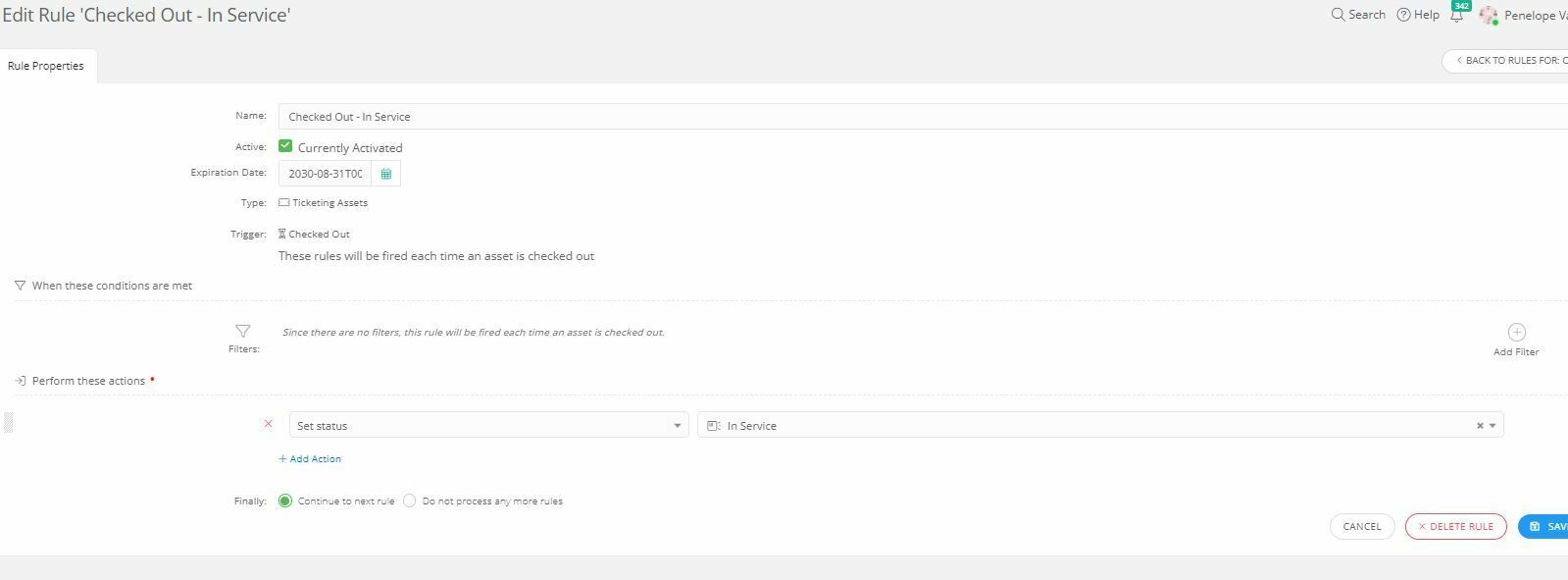
This rule that I created is super simple but may help you in the future with this issue. Whenever an asset is checked out, or assigned to a user, my rule will set the status to, “In Service” so that we can always filter and see what assets are actually being used. I also have rules set when an asset is checked out, iiQ will auto verify the asset, assign the asset location to owner’s location, send them an email as a receipt and also has our user agreement policy sent to them that has to be signed.


Kathryn Carter
Forum|alt.badge.img+18
  • On Maternity Leave
  • December 15, 2023

@PVALDESPINO 5803832 scuc Thank you for sharing your workflow on this thread! 😄


Forum|alt.badge.img+1
How do I put in a ticket?
 
My issue is
I created an icon in software/online systems in Learning applications. I tried removing it , but it is still there. How can I get rid of it? It's called SCRATCH. It's there twice.

LWoods_iiQ
Forum|alt.badge.img+5
  • Employee
  • January 8, 2026

@FMullen 6130352 longwoodcsd Thank you for reaching out with your question!

I sifted through your site and am unable to find where the duplicate in question lives. Can you provide additional details and possibly a screenshot to help me better understand and investigate? 

Thank you!