Question

Creating tickets with Ticket Templates via email submission

  • February 25, 2026
  • 8 replies
  • 69 views

Forum|alt.badge.img+4

Is there a way I can create tickets with ticket templates via email submission rule?

8 replies

Forum|alt.badge.img+2
  • Employee
  • February 25, 2026

Hi ​@ACoombs 1735452 ctecs ,


I hope you’re doing great! Currently, tickets with ticket templates can’t be created via email submission rule, because the creation of a ticket via email is based on the body and the subject of the email sent by the user. But if you can share a scenario where creating tickets with ticket templates via email submission rule can be helpful, you can submit that as an idea on our “Idea Exchange” page whose link I’ll share below:


https://community.incidentiq.com/ideas


Once you submit the idea, the updates regarding that idea will be posted there. I hope this helps! If you have any questions or concerns, please let me know. May you have a great day ahead!


Regards,

Jas


Forum|alt.badge.img+4

What about another creative way to accomplish the same goal? We have flag updates (Full or Half) that come from the state via Distro List that we want to automatically create tickets for each location to adjust the flag outside accordingly. 


JustinRaynor_iiQ
Forum|alt.badge.img+12

What about another creative way to accomplish the same goal? We have flag updates (Full or Half) that come from the state via Distro List that we want to automatically create tickets for each location to adjust the flag outside accordingly. 

Hey ​@ACoombs 1735452 ctecs,

One option you’ll also have is remote support ticketing, which provides a different URL for ticket submission that will mirror our standard ticket submission process. You’ll then be able to have ticket templates fire off based on the issue type or category. With this workflow, you could also create a specific issue category for remote support ticket and build rules based on tickets submitted from there, You would have to install it on your site and here’s a guide to get that set up:


Hopefully, this feature will help with your workflow and if you could provide the use case of the workflow you’re trying, there may be an additional workaround that we can find too!


Forum|alt.badge.img+4

What about another creative way to accomplish the same goal? We have flag updates (Full or Half) that come from the state via Distro List that we want to automatically create tickets for each location to adjust the flag outside accordingly. 

Hey ​@ACoombs 1735452 ctecs,

One option you’ll also have is remote support ticketing, which provides a different URL for ticket submission that will mirror our standard ticket submission process. You’ll then be able to have ticket templates fire off based on the issue type or category. With this workflow, you could also create a specific issue category for remote support ticket and build rules based on tickets submitted from there, You would have to install it on your site and here’s a guide to get that set up:


Hopefully, this feature will help with your workflow and if you could provide the use case of the workflow you’re trying, there may be an additional workaround that we can find too!

The problem with this is that nobody from the State or the Governors office would be filling out a ticket with us. We get notified via email, which is why I need to use that workflow. 


JustinRaynor_iiQ
Forum|alt.badge.img+12

Hey ​@ACoombs 1735452 ctecs,

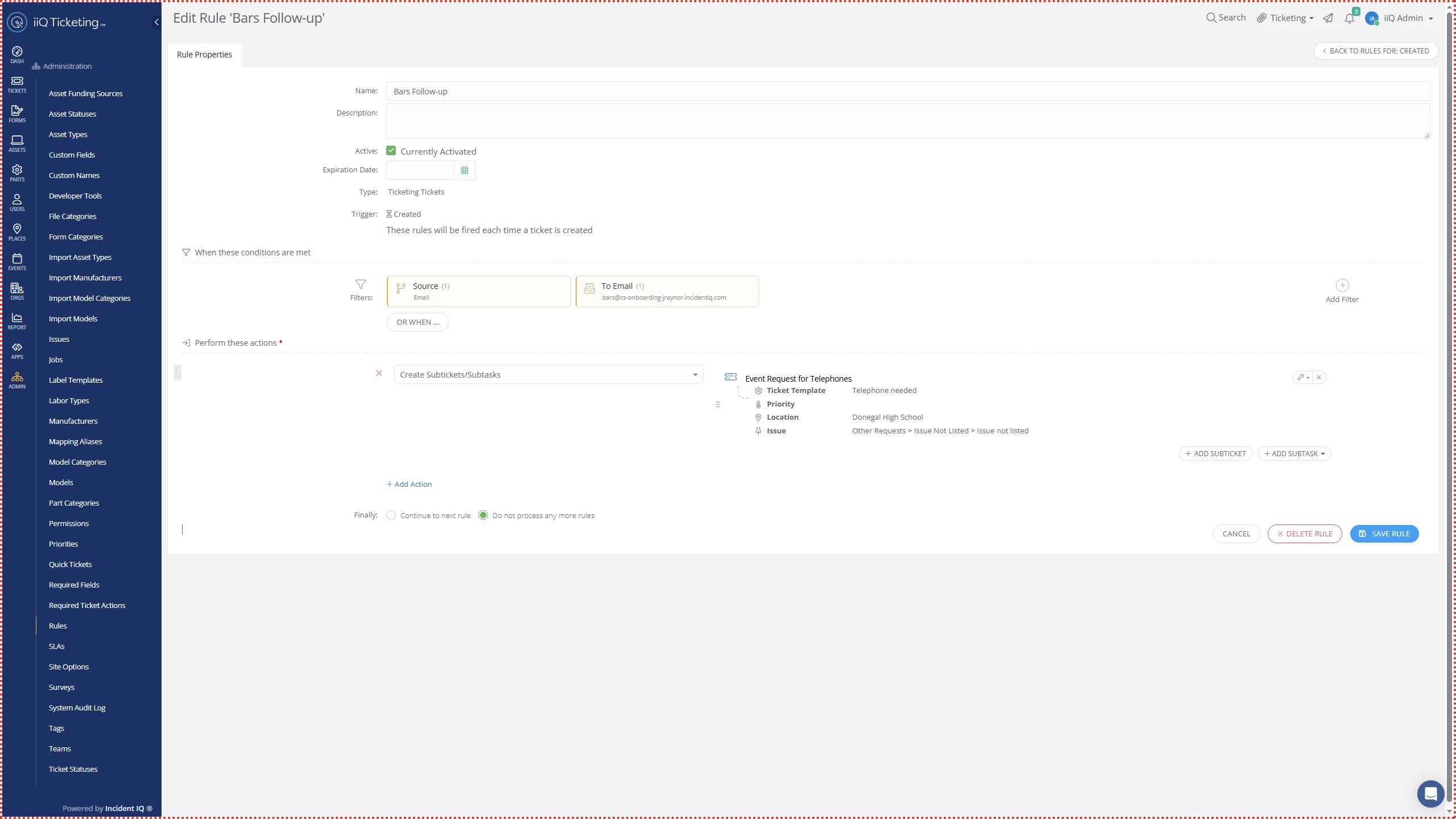
Thank you for the insight and I have another idea that might help you get the workflow you’re looking for. You can make a ticket creation rule based on the email submission and have a ticket template subticket can be created from the original email to ticket. Here’s my test to show what that would look like:


This workflow would make the original ticket the parent ticket and a child subticket would be created based on the ticket template you select. I do want to note that you’ll want to make the email to ticket rule a ‘continue to next rule’ so that the ticket creation rule can also trigger. You can set the ticket creation rule to ‘do not process’ so that none of your other ticket creation rules fire off.


Hopefully, this workflow will help you out and let me know if you see any issues with this option!


Forum|alt.badge.img+4

Hey ​@ACoombs 1735452 ctecs,

Thank you for the insight and I have another idea that might help you get the workflow you’re looking for. You can make a ticket creation rule based on the email submission and have a ticket template subticket can be created from the original email to ticket. Here’s my test to show what that would look like:


This workflow would make the original ticket the parent ticket and a child subticket would be created based on the ticket template you select. I do want to note that you’ll want to make the email to ticket rule a ‘continue to next rule’ so that the ticket creation rule can also trigger. You can set the ticket creation rule to ‘do not process’ so that none of your other ticket creation rules fire off.


Hopefully, this workflow will help you out and let me know if you see any issues with this option!

That seems to be an ok method. How can I get the contents of the parent ticket to flow down into the subtickets then?


JustinRaynor_iiQ
Forum|alt.badge.img+12

Hey ​@ACoombs 1735452 ctecs 


Since the email doesn’t have built in custom fields associated with tickets, it wouldn’t be possible to map the custom fields from email to the ticket template, but the primary email ticket would be linked to the ticket template and you would be able to review the details on that ticket


VCollins_iiQ
Forum|alt.badge.img+6
  • Employee
  • February 27, 2026

Hi ​@ACoombs 1735452 ctecs 

I think we can accomplish this in the following way:
 

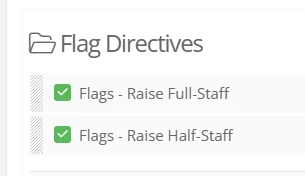
You would create two issue types. I created a top-level “Flag Directives” category


(Note that you can hide visibility to these from staff and faculty) so they don’t see these as issues they can create tickets for.

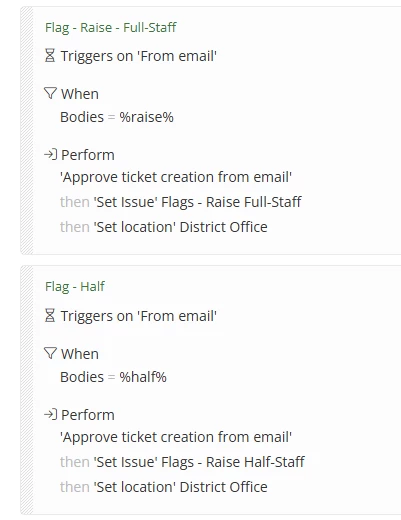
Secondly, you would need to search for the keyword(s) to verify if the message is to raise it half-staff or full. Here’s an example of two “from email” rules testing for both. Then, depending on which rule is triggered, we would add the appropriate issue type and set the location to your district office. The key here is to find the right keywords to know it’s either going to be half or full.


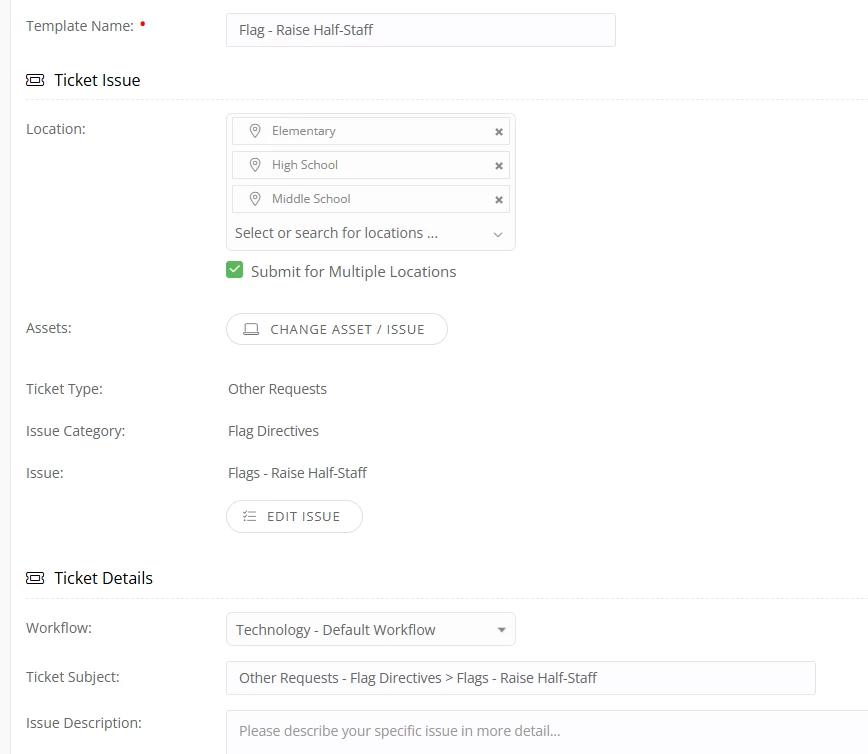
You will then create two templates, one for full-staff and the other for half-staff. Here’s an example of the Half-Staff ticket template for multiple locations (note, we aren’t going to create one for the district office because that one already exists.


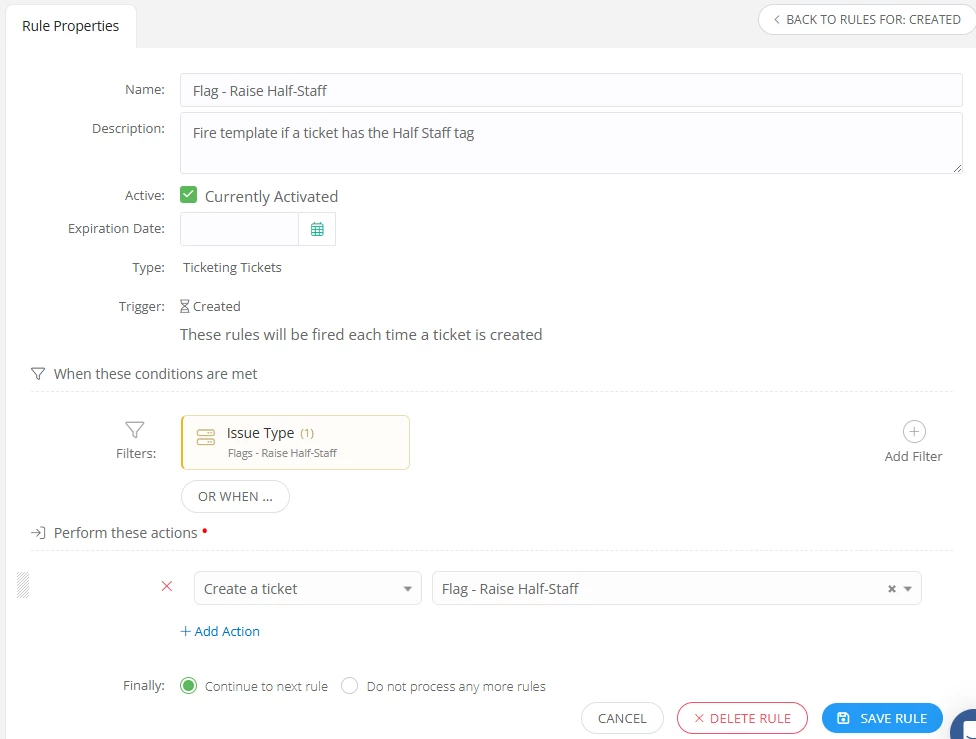
Then, in your ruleset “Tickets when Created”, you will have two rules, one testing for the issue type “Flag - Raise Half-Staff” and the other testing for the issue type “Flag - Raise Full-Staff” and fire off the appropriate ticket template.

Here’s an example of the half-staff rule


Because the directive is in the actual issue type (“Flag - Raise Half-Staff” or Flag - Raise Full-Staff), there would be no need to map to subtickets. These would just fire off individual stand alone tickets for each location.

I reached out to you via email as well if you wish to discuss further. But in theory, as long as you can test for the keywords you need up front in the email, you should be able to do this.