
Solved

New Ticket Notifications

  • August 23, 2022
  • 7 replies
  • 476 views

Forum|alt.badge.img+3

How are you going about being notified of New Tickets other than logging into and living in IIQ all day?

We don’t auto assign tickets quite yet, as there are only two of us, and we try to prioritize them and work them as we get them.  I have noticed, that when new tickets are submitted by my users, that neither of us get email notifications.  The only way either of us know about a new ticket is if we look for new tickets in IIQ.

I don’t see an option for “Ticket Creation” notifications for Agents in the Site Settings.  What is the best practice here?

Thank you all in advance for your help.

 

Best answer by arosenbaum_iiQ

@SRogers Great question! You can create a rule under “when created” (no filter needed if you want all incoming tickets included) and use the action “send email alert to user” and select yourself. If you would like it sent to both of you, you can select this action again and select the next agent. Hope this helps!

7 replies

arosenbaum_iiQ
Forum|alt.badge.img+7

@SRogers Great question! You can create a rule under “when created” (no filter needed if you want all incoming tickets included) and use the action “send email alert to user” and select yourself. If you would like it sent to both of you, you can select this action again and select the next agent. Hope this helps!


Forum|alt.badge.img+3
  • Contributor
  • May 13, 2023

@SRogers Great question! You can create a rule under “when created” (no filter needed if you want all incoming tickets included) and use the action “send email alert to user” and select yourself. If you would like it sent to both of you, you can select this action again and select the next agent. Hope this helps!


I am new to IQ and wanted to follow up on this. We are able to email agents when a new ticket is created with the steps you mentioned but I waned to see if it was possible to add a dynamic subject in the rule so that the agent has the ticket # in the subject of their email? Otherwise all the emails coming in look the same. 


Thanks

Ron


arosenbaum_iiQ
Forum|alt.badge.img+7

Hi @RWatson! You are correct in that using the rule to email does not have a dynamic subject line. I would suggest either assigning tickets to an agent or team (can be a team of 1) and taking advantage of our notifications under site options. This will allow for more visibility on which ticket is associated with which notification. 


I came here looking for an answer to this same question. We are new to IIQ and are also a very small team. I don’t spend all day refreshing IIQ. I have other tasks to attend to. 

I have added the rule per this thread and that helps some but I wish there was more options.

Our old system has a “kiosk” mode where it listed tickets as tiles, the page auto-refreshed and made a sound when a new ticket was added. We kept it on a large screen in the office so we always had an easy visual (and audio signal) when there was movement of tickets.


Kathryn Carter
Forum|alt.badge.img+18
  • On Maternity Leave
  • August 8, 2023

@DAdmin 9030af1 schuylerville Thank you for your response! Please add your comment here: 

This idea is in the candidate stage but still needs more votes and comments to continue to move forward. Your comment is a perfect example of the feedback our Product team is looking for! 


Forum|alt.badge.img+1

We used this strategy, but recently it stopped working. We created a rule that says when a ticket is created email the user. It’s still active, but those users are not getting the notification. Any ideas why it would have stopped working? 


Forum|alt.badge.img+5
  • Participant
  • January 27, 2026

@SLee-Ciambra 873a0c9 sau70 You should be able to see under the Rule Log section of a ticket if the rule is being triggered and perhaps in the Emails section of the ticket if an email was sent out or bounced. If I was in your situation, I would reach out to both your CSM or place an IIQ support ticket.

I would hope it’s unlikely it applies to you, but we were in a similar situation and discovered that there was a bug and none of our users were receiving any email notifications at all. It required IIQ’s support team (after months of troubleshooting) to manually update our user’s notification settings.

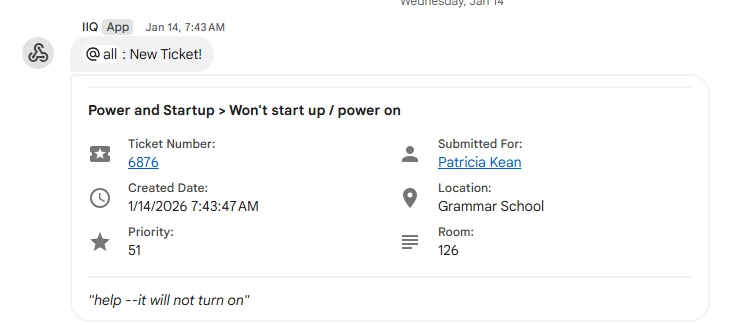
Side note for others in this thread, we used this community post from ​@jclark to set up a Google Chat space/chat for this purpose. Takes some setup, but we’ve been using it for many months without issue. At the exact moment a ticket is submitted into the system, any members of the Chat get an audible noise followed by a notification. 


Example of how it looks on desktop