
Question

Follow an Asset

  • February 5, 2026
  • 2 replies
  • 31 views

Forum|alt.badge.img+10

Does anybody have a method to Follow an Asset?
Example, we have (6) locations.  Sometimes, a Parent/Staff will have a Student tech device that is expected to be returned or involved in a ticket.

We don’t want a Rule to get notifications on ALL Asset changes.  We just want the ability to Follow an Asset.  So, if we are expecting something… we can get notified when it happens.  Like, the Parent/Staff returns it at one of the school locations… it gets Checked In (which those Rules don’t work very well to begin with… but we don’t want notifications for All).

If there was an option to Follow an Asset, then an Agent/Team expecting something to change with an Asset can just be notified specifically.

2 replies

Emily Jones
Forum|alt.badge.img+7
  • Community Manager
  • February 11, 2026

@jo.cpa Thank you for submitting your question to our community! 😄


This functionality you are describing does not currently exist, however, I think this would be a great suggestion to add to our Idea Exchange linked below! 


https://community.incidentiq.com/ideas


Please let me know if you have any other questions! 


Best,


Forum|alt.badge.img+6
  • Observer
  • February 12, 2026

I’m not sure if this will be helpful, but we do have a process in place for our Virtual School student devices that notifies Virtual School staff when a device is checked in.

We identify these devices using a custom field that designates them as Virtual School student devices. I then created a couple of asset rules (I know you’re not a fan) that trigger when a device is Checked In.

  • The first rule fires when the custom field FLVS = Yes. This rule assigns the device location to Virtual School, sets the Storage Unit/Box to “Needs Imaged” (which we created for this purpose), and updates the status to In Storage.

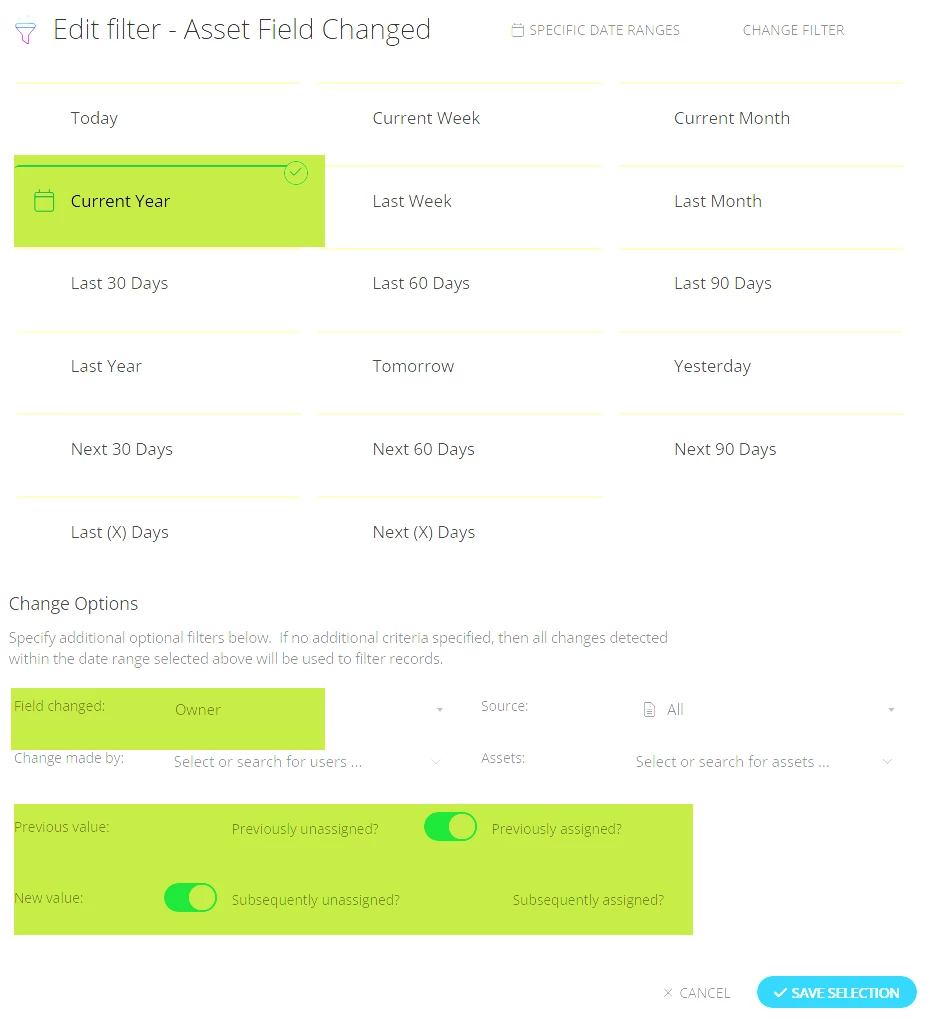
  • The second rule uses an Asset Field Changed filter with the following options selected:


This second rule sends an email notification to an informational mailbox that Virtual School staff monitor daily, alerting them when a Virtual School device has been checked in.

I realize this may not be the exact procedure you’re looking for, but I wanted to share it in case it’s helpful.