Solved

How to view or set filter for Students that don't have assigned device ( Chromebook )

  • August 17, 2026
  • 5 replies
  • 38 views

Forum|alt.badge.img+2

Hi All,

   Is there a way to view or run a report for Students that do not have an assigned device  ( Chromebook ) yet. Please advise. Thank you in advance and have a great one!

-Cesar

Best answer by jclark

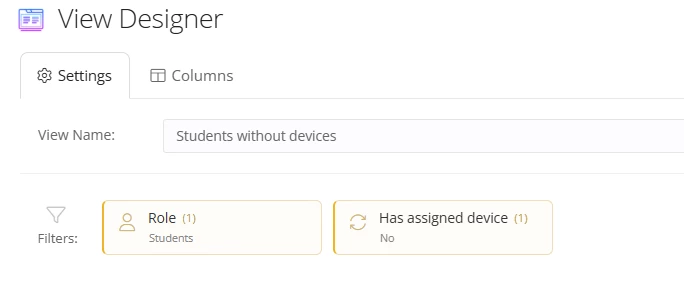
You’ll create a custom “User” view.
Filters:


5 replies

Forum|alt.badge.img+17
  • Specialist
  • Answer
  • August 17, 2026

You’ll create a custom “User” view.
Filters:


Forum|alt.badge.img+2

Thanks jclark!

   How do I add the filter “ Has no Device” ? I don’t see that option on our iiq. Do I have to let our Super Admin on IIQ to add it? Please advise. Thanks again!


Forum|alt.badge.img+17
  • Specialist
  • August 17, 2026

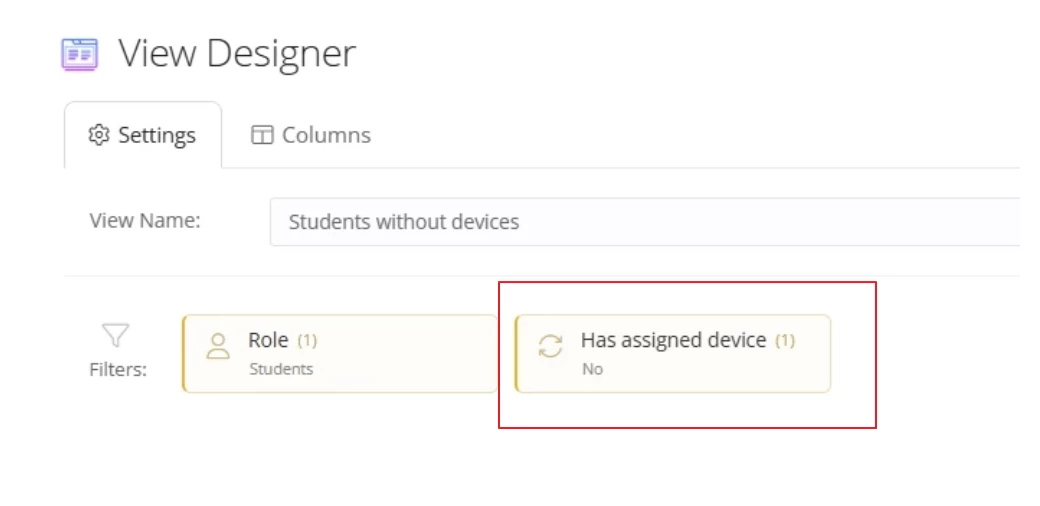
You should be able to search exact what’s shown in the image - “Has assigned device”
This filter is available on “User” views, not “Asset” views.


Forum|alt.badge.img+2

Thank you so much! Found it. 


Kathryn Carter
Forum|alt.badge.img+18
  • Community Manager
  • August 18, 2026

Thanks ​@jclark for getting ​@CMayo 987c8bd smfcsd question answered quick! This is what our community is all about! 

@CMayo 987c8bd smfcsd Thank you for coming to community to ask your question! We are so glad you were able to receive a quick & accurate answer. Please let us know if there is anything else you need!