
Question

Rules - Chromebook - Last Login more than 21 days

  • May 21, 2026
  • 3 replies
  • 39 views

Forum|alt.badge.img+12

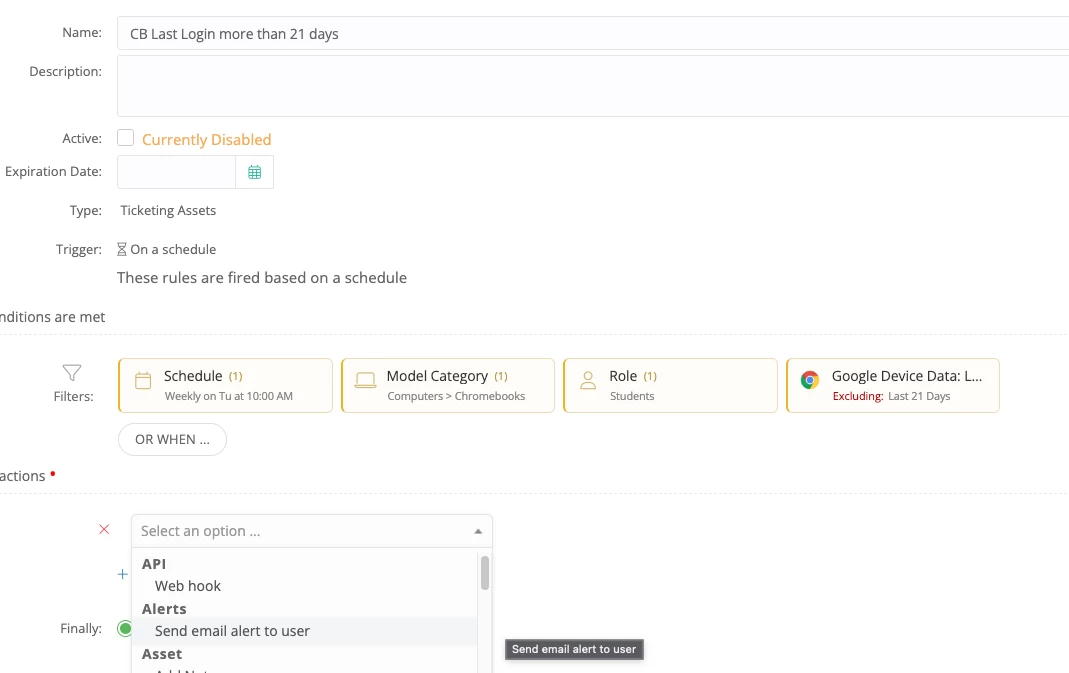
How can we send an email to a Parent using Rules to alert the parent that the Student has not used the Chromebook for 21+ days?

There is no option to send to the Parent.
 

3 replies

Forum|alt.badge.img+5

No way of doing this without manually copying the parent address. 


Forum|alt.badge.img+16
  • Specialist
  • May 22, 2026

You can possibly webhook the data to Apps Script and have Apps Script send the email. I would make sure to create the script with a service account so it doesn't look like the emails are coming from you.


Another word of caution, but the "Last Login Date" isn't actually a login date but just a recent activity date (unrelated to a specific user) that they are linking to a user. I've been in discussions with folks at iiQ about this for quite some time. I would be wary of using this data for the purposes of holding a student accountable for any reason.


Forum|alt.badge.img+12
  • Author
  • Mentor
  • May 22, 2026

Re: the Last Login… this is just an example.  I really want to use the Asset Recent User Mismatch in the Rule, but it isn’t even available there.

This lack of messaging the Parent of an Assignee is an area where iiQ completely drops the ball.

We’re not going to message Assignees/young kids about things that the Parents need to know.
iiQ doesn’t have a method for this… which I find unbelievable.

We have many households with multiple young students that get their devices mixed up

  • Grade level OU based settings, apps, testing get mixed up
  • Content Filtering/Safety permissions get mixed up
  • Accountability and inventory gets mixed up

While iiQ or a layperson might say “just have the parents double check the asset tag and assignment”, that is a poor solution and it doesn’t always work for busy working families.

Why don’t the Rules allow emailing the associated Parent of an Assignee?