Question

Passing a ticket to maintenance and then back

  • Jan 23, 2026 6:55 PM UTC
  • 3 replies
  • 60 views

Forum|alt.badge.img+3

Hoping someone can help with a good workflow here.

It has a ticket for installing a new TV or projector. After we check out the space and order the necessary devices, we want to create a new ticket in the Facilities side and set the status of the Tech ticket to “Waiting on Maintenance”. Once Maintenance installs the TV and closes their ticket, we want the status of the original Tech ticket to be changed back to “in Progress”.


Can this be done as I explained, or can/should we somehow assign the original ticket to the Facilities side and then somehow have them send it back to us when they are done?


I’m sure other districts have workflows that span both modules and I’d love to see how it’s done.

!--a=1-->


3 replies

Emily Jones
Forum|alt.badge.img+10
  • Community Manager
  • Jan 27, 2026 10:37 PM UTC

Hi! ​@KBremner 76000e4 mtbluersd Thank you for submitting your question in Community! 😄

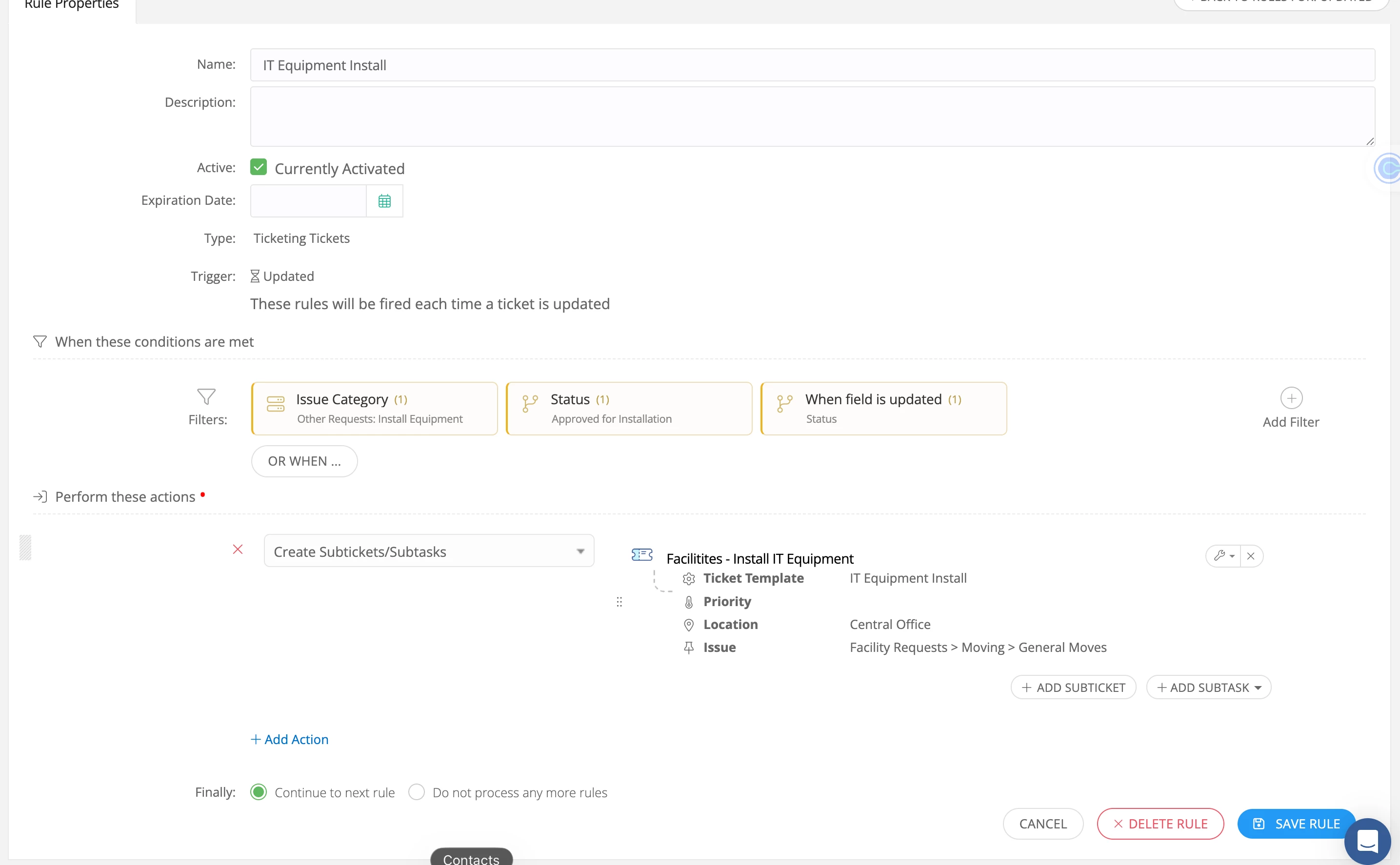
I would suggest using Subtickets for this workflow. Using the Create SubTickets action within a when updated rule.

You would need to first set up a ticket template on the Facilities side since we want the ticket to be created in that module. 

After setting the ticket template up in Facilities you can then create a rule in IT. You can set this up under the “When Updated” trigger for instance if you want to require your IT Agent to update the status of the original ticket to a certain status such as “Approved for Installation” which then triggers the Facilities subticket to be created.

I would also suggest adding a filter for the issue category of ticket this should trigger based on. Here is an example of how this rule could be set up. 


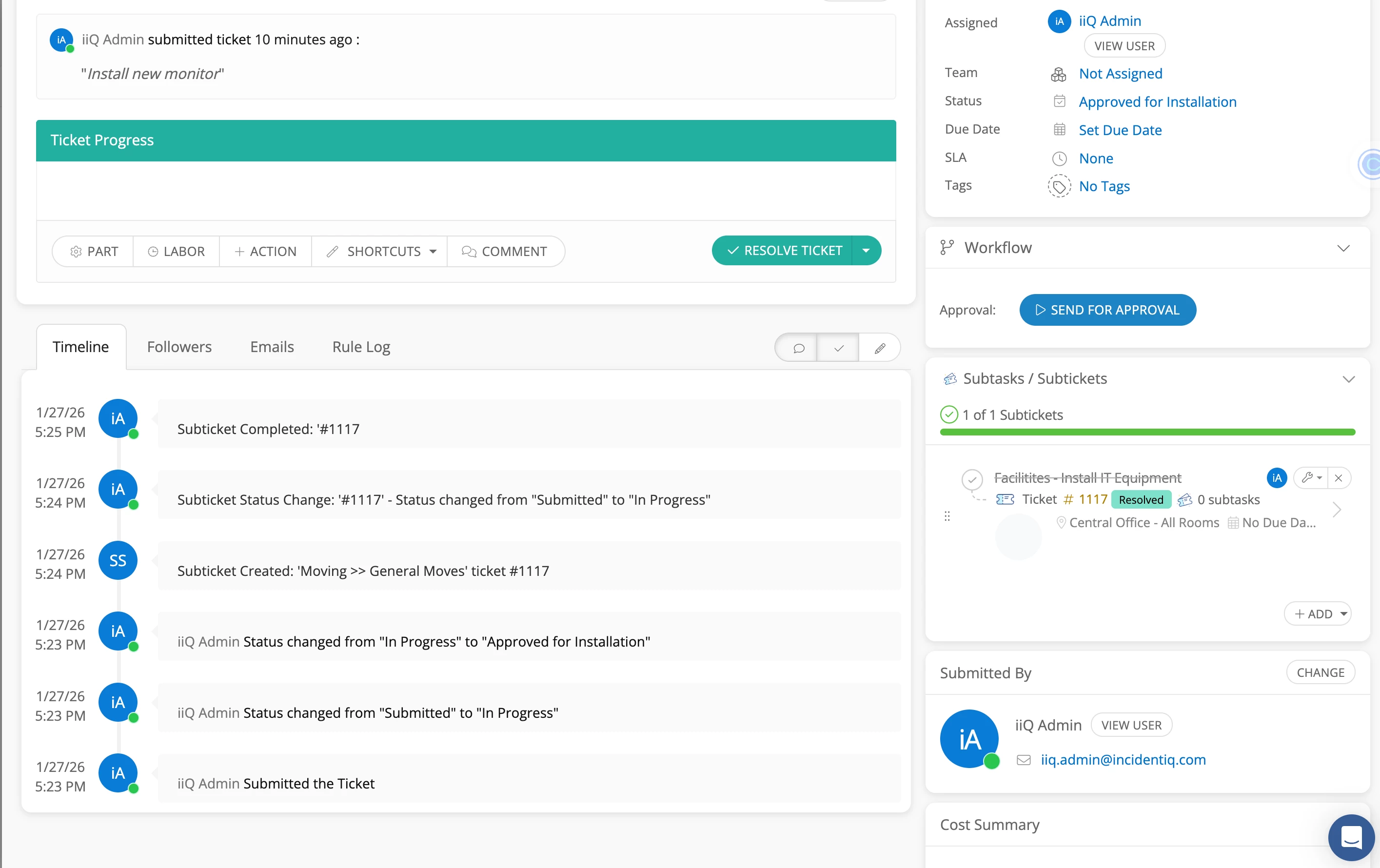
Once the subticket is closed by the Facilities team it will show that update within the originating IT ticket! 


Additionally, here is our KB guide on using Subtickets! 


And the Academy Course! 

iiQ Academy - Advanced Ticketing


I hope this helps! Please feel free to reach out if you have any questions!


Best, 

Emily


Forum|alt.badge.img+3

I’ve worked through much of that already. We are using a shortcut to create the sub-ticket and then change the status of the parent ticket to “Waiting on Maintenance”. What I’m stuck on is the rule that should get triggered when the sub-ticket gets resolved by Maintenance that will update the status of the parent ticket to “in progress” again. I assume it would be rule in the IT side based on the sub-ticket being resolved.

To complicate things...after Maintenance finished their work and then our IT staff go back to the room to finish our setup, we add another sub-ticket to the parent ticket to have our Tech Integration staff reach out to the classroom teacher to offer their services if necessary.

!--a=1-->

Emily Jones
Forum|alt.badge.img+10
  • Community Manager
  • Jan 29, 2026 7:43 PM UTC

​@KBremner 76000e4 mtbluersd Thank you for the update! 

Currently, I am not seeing that functionality exists to be able to update the status of the originating ticket in IT if the subticket is resolved from the Facilities module. 

I believe this would be a great idea for an enhancement request and I highly recommend adding it in the Idea Exchange linked here. 

I'm also going to tag your Customer Success Manager (CSM) ​@NRiley_iiQ here so you can reach out to them if you need further assistance with your workflow in a one-on-one setting! 😁

Best,