Where in the ticket that is submitted can we make a comment? Where can we view a teachers reply to that comment in their ticket?
For instance if a teacher sends a request for tech help, where can I comment a reply with the option to be notified when the do reply? Also if they send a response to that reply sent by our tech dept, where do you view that?
Best answer by JDhanjal_iiQ
Hi @taumulle ,
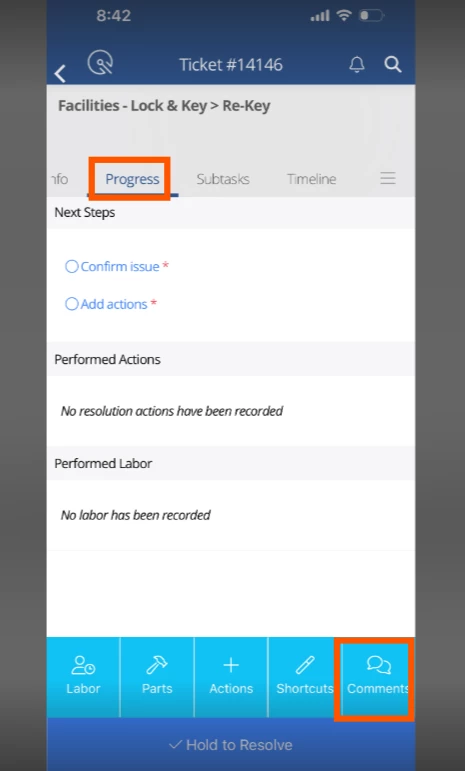
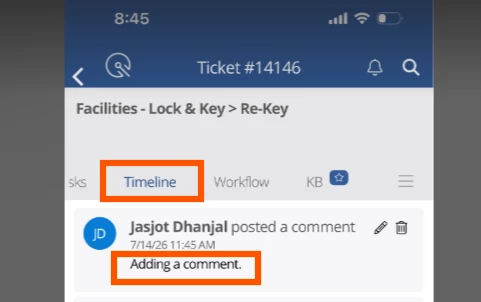
I hope you’re doing great! To make a comment on a ticket in the IIQ mobile app, you can click on the “Progress” tab. Once selected, the option to add a comment will appear at the bottom for the user to make a comment on the ticket. All the comments made by users, for example, Agent’s comment, and Teacher’s reply to that comment can be viewed under the “Timeline” tab. I’ll attach a few screenshots for your reference.
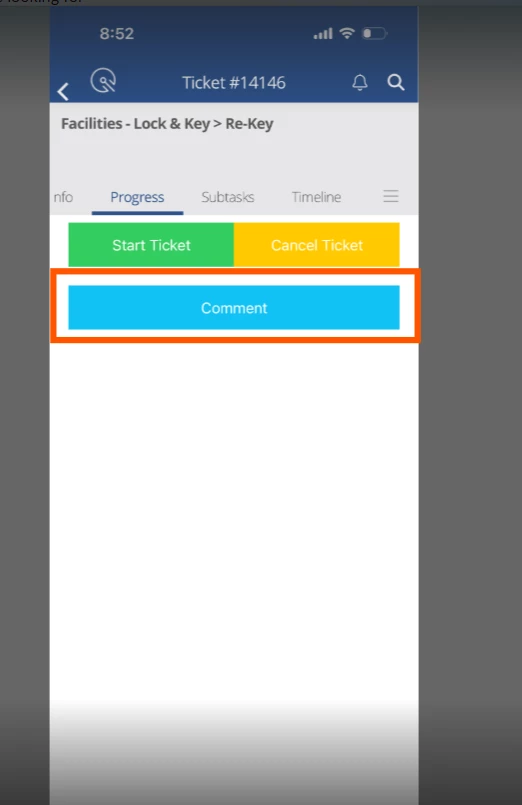
If the ticket is in “Submitted” stage, you will see three options under the “Progress” tab, “Start Ticket”, Cancel Ticket” and “Comment”. You can click on “Comment” to add a comment on the ticket which is in “Submitted” stage.
I hope this helps! If you have any questions or concerns, please let me know. May you have a great day ahead!
I hope you’re doing great! To make a comment on a ticket in the IIQ mobile app, you can click on the “Progress” tab. Once selected, the option to add a comment will appear at the bottom for the user to make a comment on the ticket. All the comments made by users, for example, Agent’s comment, and Teacher’s reply to that comment can be viewed under the “Timeline” tab. I’ll attach a few screenshots for your reference.
If the ticket is in “Submitted” stage, you will see three options under the “Progress” tab, “Start Ticket”, Cancel Ticket” and “Comment”. You can click on “Comment” to add a comment on the ticket which is in “Submitted” stage.
I hope this helps! If you have any questions or concerns, please let me know. May you have a great day ahead!