
Question

Agents and iiQ Administrators separated when assigning tickets

  • Apr 27, 2026 5:50 PM UTC
  • 5 replies
  • 28 views

Steve Rinehart
Forum|alt.badge.img+3

This is a small thing, but it’s driving my director, my staff and myself absolutely nuts.


When we go to assign tickets to someone, and that person is an IncidentIQ Admin in our system, we have to specifically change the role from Agent to iiQ Administrator to find the person to whom we wish to assign the ticket.


Is there some way to have the platform search all people when assigning tickets?


Thank you,

Steve Rinehart
Cybersecurity and Help Desk Engineer
Walla Walla Public Schools
Helpdesk: 509.526.6745 or ext. 4357 (HELP) |
helpdesk@wwps.org | 
https://wwps.incidentiq.com/
Office: 509.526.6758 | srinehart@wwps.org
Address: 364 S Park St, Walla Walla, WA 99362
"Developing Washington's most sought-after graduates"

5 replies

Forum|alt.badge.img+8
  • Participant
  • Apr 27, 2026 5:51 PM UTC

This is a small thing, but it’s driving my director, my staff and myself absolutely nuts.


When we go to assign tickets to someone, and that person is an IncidentIQ Admin in our system, we have to specifically change from Agent to iiQ Administrator to find the person to whom we wish to assign the ticket.


Is there some way to have the platform search all people when assigning tickets?


Thank you,

Steve Rinehart
Cybersecurity and Help Desk Engineer
Walla Walla Public Schools
Helpdesk: 509.526.6745 or ext. 4357 (HELP) |
helpdesk@wwps.org | 
https://wwps.incidentiq.com/
Office: 509.526.6758 | srinehart@wwps.org
Address: 364 S Park St, Walla Walla, WA 99362
"Developing Washington's most sought-after graduates"

We have the same issue here!


Emily Jones
Forum|alt.badge.img+10
  • Community Manager
  • Apr 27, 2026 7:01 PM UTC

Hi! ​@Steve Rinehart and ​@angiejaeger 

Thank you for submitting your question to our community! 😄 

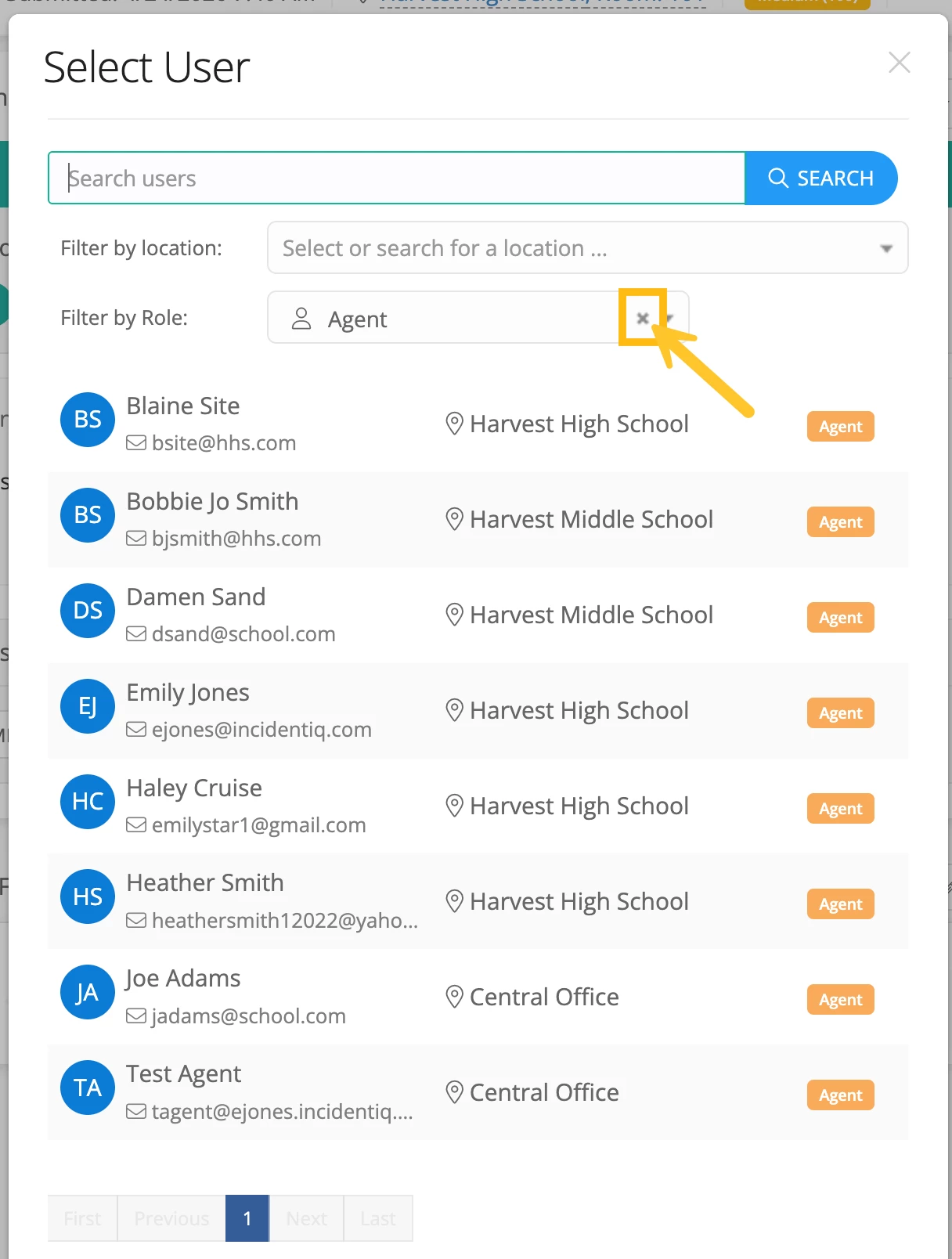
When going to assign a ticket to a user, instead of switching the role, you can simply select the “x” next to the role to remove it. This will then allow you to search all users in your instance! 


I hope this helps! Let us know if you have any other questions or concerns!


Best,


EStapf_iiQ
Forum|alt.badge.img+14
  • Employee
  • Apr 27, 2026 7:14 PM UTC

You can also check out this already open idea in the Idea Exchange!


Steve Rinehart
Forum|alt.badge.img+3

Hi! ​@Steve Rinehart and ​@angiejaeger 

Thank you for submitting your question to our community! 😄 

When going to assign a ticket to a user, instead of switching the role, you can simply select the “x” next to the role to remove it. This will then allow you to search all users in your instance! 


I hope this helps! Let us know if you have any other questions or concerns!


Best,


Thank you, Emily. Is there any way to make the Filter by Role: field blank by default?


Thank you,

Steve Rinehart
Cybersecurity and Help Desk Engineer
Walla Walla Public Schools
Helpdesk: 509.526.6745 or ext. 4357 (HELP) |
helpdesk@wwps.org | https://wwps.incidentiq.com/
Office: 509.526.6758 | srinehart@wwps.org
Address: 364 S Park St, Walla Walla, WA 99362
"Developing Washington's most sought-after graduates"


Emily Jones
Forum|alt.badge.img+10
  • Community Manager
  • Apr 27, 2026 7:37 PM UTC

​@Steve Rinehart Unfortunately, there is not currently a way to change which filter it is defaulting to or to remove it by default. 

If you would like, you could add this in as an enhancement idea in our Idea Exchange. Adding it there allows our product team to get an idea of what enhancements are needed and how it would benefit your district. 

Here is the link to our Idea Exchange if you would like to add it there! 

https://community.incidentiq.com/ideas

Best,