Solved

Email agents when date and/or time changes on event ticket

  • Jun 12, 2026 10:51 PM UTC
  • 1 reply
  • 22 views

Hi All. I’m new to IIQ. I hope this is is something minor that has an easy fix someone can point out to me...I can’t figure out how to get an email message to send to event ticket followers when the date/time of an event has changed.  Specifically, an email that shows what has changed (the new date/time).  The followers are agents (maybe technically teams?) who get added based on selections the initial user made when filling out the event request form.  The agents get added as followers when the ticket status changes to its “final approval” status.  It’s common for our dates and times to change after events have already received approval.

Followers being notified when the date/time has changed is an EXTREMELY important deal for us.  As a workaround, I see that I can add shortcuts that will add generic comments on the ticket like “the date/time of this ticket has changed - sign in to see the changes.”  I’d ideally like to add a variable directly to that to show the current start and end dates/times, but that variable doesn’t seem to exist.

I could use any feedback or suggestions anyone can offer for this situation.
Best answer by jmaynard_iiQ

Hi ​@LTonet 6538b1b wt 

Welcome to the Incident IQ community!

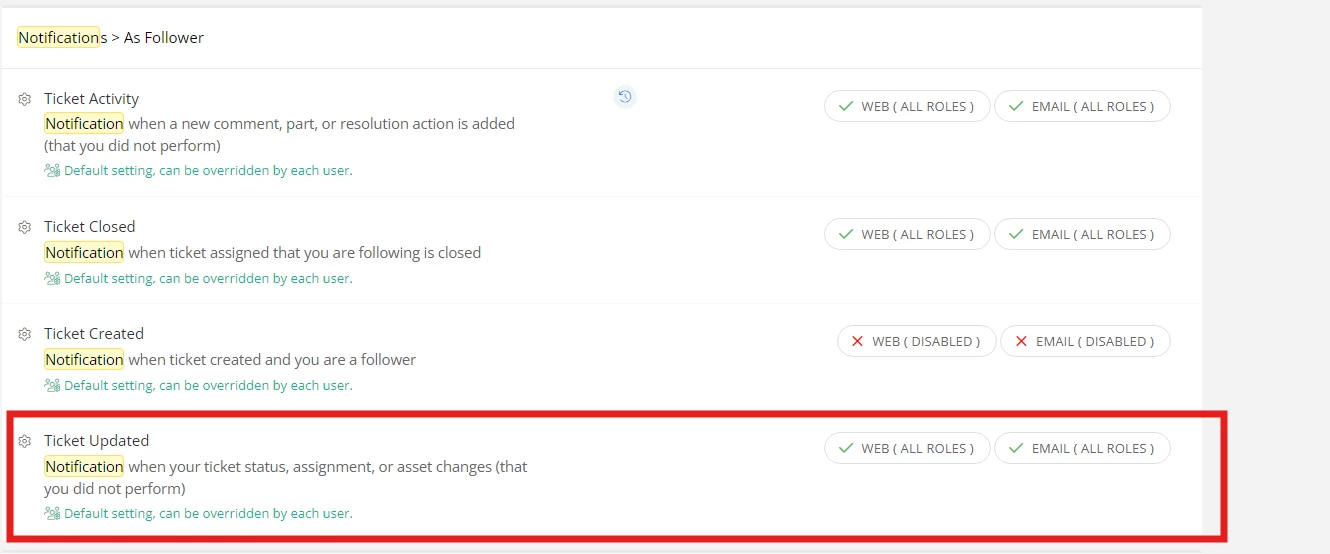
You can manage global ticket email notifications for followers by navigating to Events > Admin > Site Options in your left navigation bar. From there, search for “notifications” to bring up the user notification settings, where you will find the "As Follower" options to control which roles receive updates for event tickets.

Currently, follower specific notifications are not supported as an action target within our Rules Engine. I apologize for this limitation, as I know how critical it is to keep users/agents updated when dates shift.

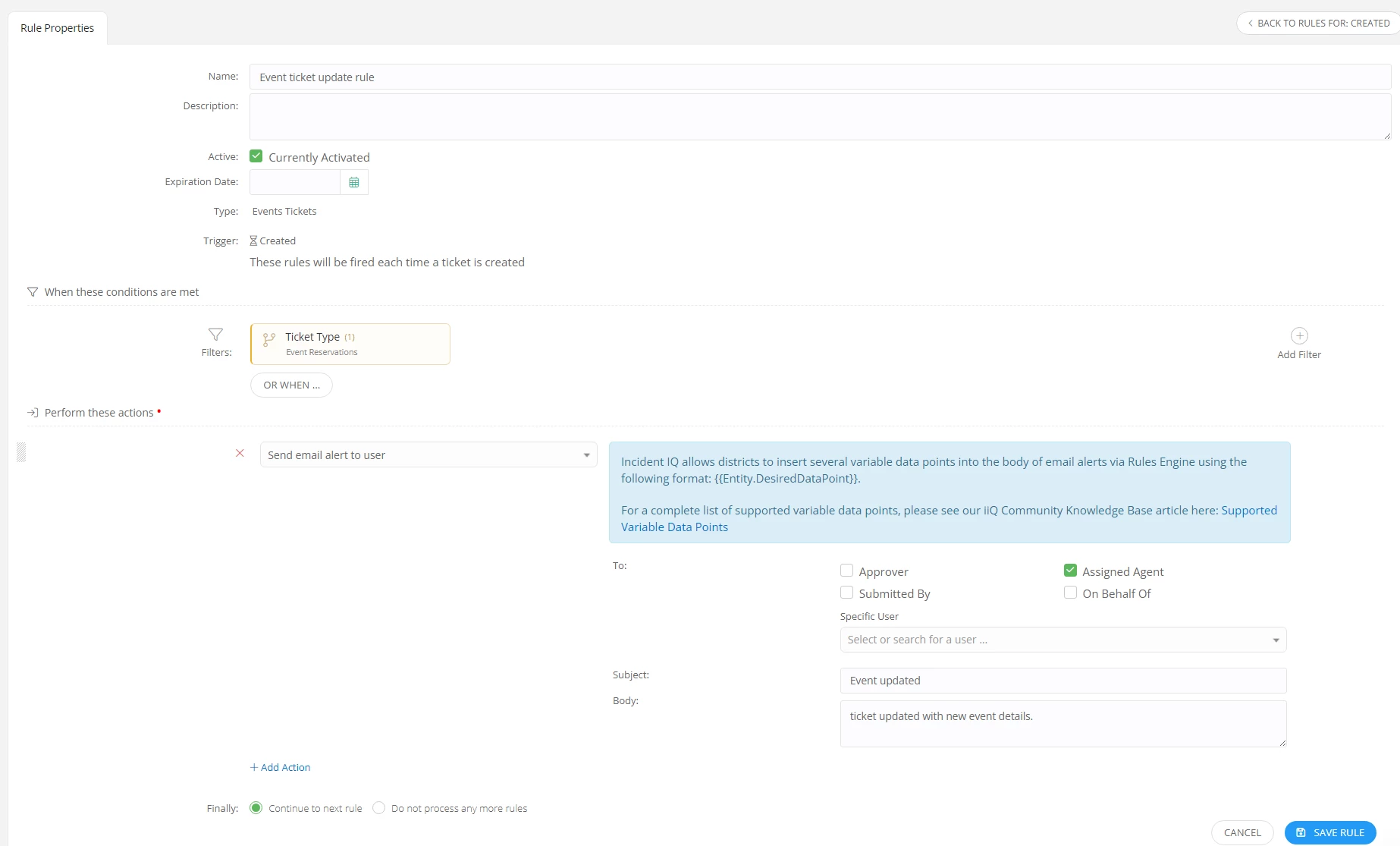
As a temporary workaround, many districts use the Rules Engine to target a team or the assigned agent to a ticket when updates occur. You can do this by creating a rule under Admin > Rules > Tickets > When “updated”. I have provided an example of how this rule would look. Feel free to add additional filters to be more granular with when the rule fires off those notifications. Make sure you create the rules specifically under the Events module so it applies only to events tickets.


Although follower specific notifications aren’t natively supported in the Rules Engine right now, our product team would love to hear your use case and any ideas you have in mind to enhance this workflow. Please submit your ideas to the idea exchange!


Idea Exchange - https://community.incidentiq.com/ideas


If you have any additional questions or concerns, please don’t hesitate to let me know!


View original

1 reply

Forum|alt.badge.img+4
  • Employee
  • Answer
  • Jun 13, 2026 12:20 AM UTC

Hi ​@LTonet 6538b1b wt 

Welcome to the Incident IQ community!

You can manage global ticket email notifications for followers by navigating to Events > Admin > Site Options in your left navigation bar. From there, search for “notifications” to bring up the user notification settings, where you will find the "As Follower" options to control which roles receive updates for event tickets.

Currently, follower specific notifications are not supported as an action target within our Rules Engine. I apologize for this limitation, as I know how critical it is to keep users/agents updated when dates shift.

As a temporary workaround, many districts use the Rules Engine to target a team or the assigned agent to a ticket when updates occur. You can do this by creating a rule under Admin > Rules > Tickets > When “updated”. I have provided an example of how this rule would look. Feel free to add additional filters to be more granular with when the rule fires off those notifications. Make sure you create the rules specifically under the Events module so it applies only to events tickets.


Although follower specific notifications aren’t natively supported in the Rules Engine right now, our product team would love to hear your use case and any ideas you have in mind to enhance this workflow. Please submit your ideas to the idea exchange!


Idea Exchange - https://community.incidentiq.com/ideas


If you have any additional questions or concerns, please don’t hesitate to let me know!