
Solved

Generate a Ticket When a Students changes to No Access

  • Dec 17, 2025 8:24 PM UTC
  • 3 replies
  • 47 views

Gary_KCMO
Participant
Forum|alt.badge.img+4

Good afternoon,

We would like a ticket to be generated when a student leaves/changes to No Access. We dug around in rules and did not come up with a way to do this. We want to do this so that we are sure that district devices, books, etc. are returned. Has anyone else set something up like this?

Thank you and have a great Holiday Season!

And sorry for the bad grammar in the subject line! UGH!
Best answer by PDonahue_iiQ

Hi Gary in KC! I’m Patrick from KC, but the good side. Kansas :)

Thanks for putting this question into Community. It looks like we can get you close to where you’d like to be, but without the ability to distinguish if the current No Access user is Staff or Student. 

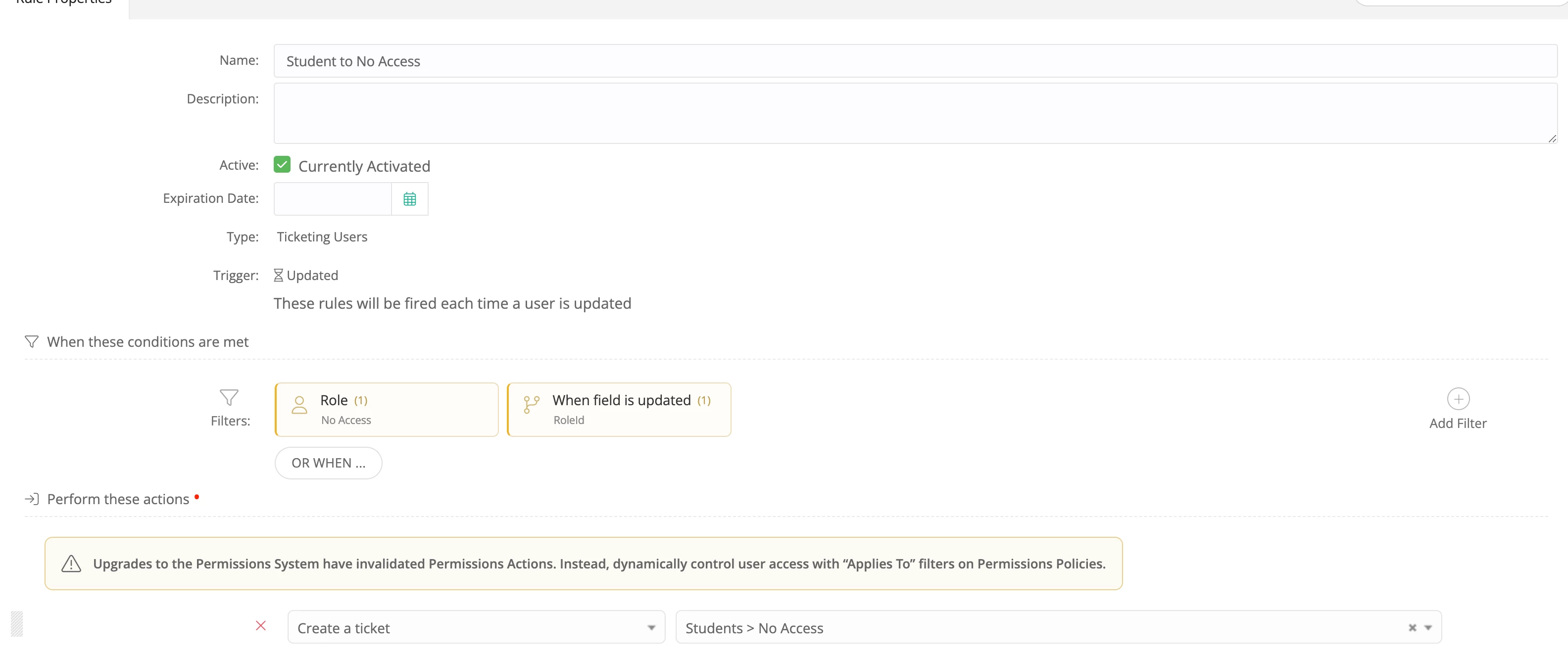
You’ll see from this Users > Updated rule that we can tell the rule to look when a Role is updated for a user to No Access to fire off a ticket template. Since all users can fall into the No Access bucket, at this time we’re unable to distinguish between the Role they came from. 

There is an open Idea Exchange for this that I’d suggest upvoting! 


View original

3 replies

PDonahue_iiQ
Forum|alt.badge.img
  • Employee
  • Answer
  • Dec 17, 2025 8:55 PM UTC

Hi Gary in KC! I’m Patrick from KC, but the good side. Kansas :)

Thanks for putting this question into Community. It looks like we can get you close to where you’d like to be, but without the ability to distinguish if the current No Access user is Staff or Student. 

You’ll see from this Users > Updated rule that we can tell the rule to look when a Role is updated for a user to No Access to fire off a ticket template. Since all users can fall into the No Access bucket, at this time we’re unable to distinguish between the Role they came from. 

There is an open Idea Exchange for this that I’d suggest upvoting! 


Gary_KCMO
Participant
Forum|alt.badge.img+4
  • Author
  • Participant
  • Dec 17, 2025 9:07 PM UTC

Hi Gary in KC! I’m Patrick from KC, but the good side. Kansas :)

Thanks for putting this question into Community. It looks like we can get you close to where you’d like to be, but without the ability to distinguish if the current No Access user is Staff or Student. 

You’ll see from this Users > Updated rule that we can tell the rule to look when a Role is updated for a user to No Access to fire off a ticket template. Since all users can fall into the No Access bucket, at this time we’re unable to distinguish between the Role they came from. 

There is an open Idea Exchange for this that I’d suggest upvoting! 


Hey Patrick!

We may have a disagreement about which is the good side, but we can still be friends! :)

I did see what you are talking about but wanted a way to filter it down to only students. We may have to just run with it for both Staff and Students since it’s really not a bad idea to track both when they leave.

Thanks for your answer!


LCampbell
Contributor
Forum|alt.badge.img+5
  • Contributor
  • Dec 19, 2025 8:41 PM UTC

I have something similar in mind, though I’m trying to do it for staff. We use Google as our source of truth, and I had thought that we might be able to use the Google OrgUnitPath custom field to create tickets when users are moved into one of our /Staff/Inactive OUs. Unfortunately, when staff are deactivated in Google and set to No Access in IIQ, the Google SSO sync doesn’t update the IIQ record with their new Inactive OrgUnitPath, so I can’t fire off rules that way.

All to say, a Previous Role field would be invaluable in creating tickets for offboarding users.

When: Updated
When Field is updated == RoleId
If (Previous Role = Staff OR Faculty) AND Role = No Access {
Create ticket from Template: Offboard User
}