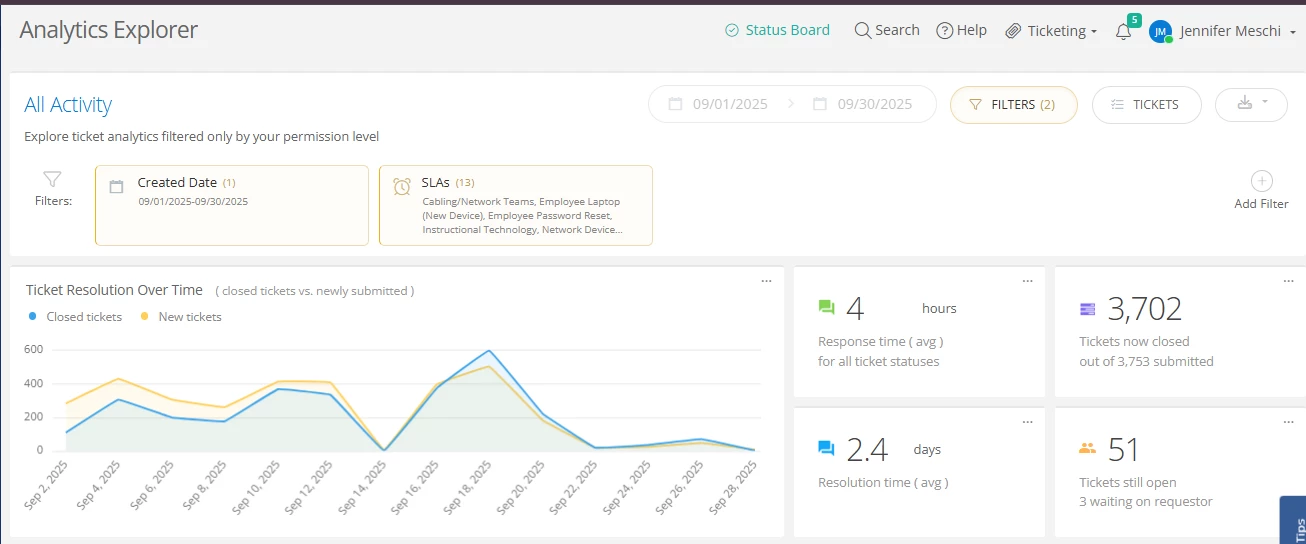
I am trying to recreate the metrics on the analytics dashboard, specifically the “Response Time Average for all ticket statuses”
I have created a custom ticket view - but when I export the data and calculate the average it does NOT match the average response time when I am on the same custom view, and click analytics.
Has anyone else had this issue? What does specifically the “all ticket statuses” mean?
Thanks!
Jenn
Best answer by EStapf_iiQ
@calexander Thanks for the inquiry! When @JMeschi 823a0b5 cherokee and I met we had basically come to the same conclusion. 🤗 SLA times are based on the ‘working hours’ that are set behind the scenes (by someone like your implementation specialist or CSM). Their working hours = 8 working hours. We talked about updating their different SLAs perimeters to similar time scales. For instance, they had one SLA that was in hours and one that was in days, which was making exporting the data difficult because they weren’t being calculated the same way. In the example I was provided above one SLA was 3.8 hours (rounds up to 4) and one SLA said .5 day (8/2=4). It’s the same thing, but just seems different because of the time scale difference We also determined that having a ‘generalized’ SLA that would be applied to every ticket, regardless of issue category or ticket type would be very beneficial, in addition to their team specific SLAs they were already tracking. Hope this helps!
@JMeschi 823a0b5 cherokee Hi 👋🏻 and thanks for reaching out via the iiQ Community! Would you be able to provide us with some screenshots since custom views can be so customizable?
Generally speaking, ticket status’ map to a workflow stage, which drives things like what can (or can’t) be done in a ticket. These also connect to a ticket state of either open or closed. So for instance, the Submitted workflow says a ticket can be started, canceled, or commented on. The ticket status can be mapped to any words the district likes and that workflow state is in the open state. A ticket mapped to the Resolved workflow stage says that nothing can be done to the ticket and is in the closed state.
Does that help? As the CSM for Cherokee Co. Schools, I’m always happy to schedule some time to dive in deeper.
Thanks so much! I am newly supporting CCSD, nice to meet you!
From Reports → Tickets → Filter for created 9/1-9/30 and apply all SLAs. This is the default and has not been customized. Screen shot below.
It shows me an average response time of 4 hours.
However when I go to Tickets → created a custom view with the exact same filters → and export it to Excel, the average response time from the SLA does NOT match the average response time shown on the screenshot above.
So my question is - what is the metric definition of “Response time (avg.) for all ticket statuses? I believe that is a default metric. If not, please tell me where it is defined in the admin set-up.
I would like to set-up a meeting to discuss further. I have a single ticket example that would help explain the discrepancy I am seeing. I will submit a support case.
Issue: Response Time in application not matching response time in Export
I would like to understand if the discrepancy I am seeing between response time on this single ticket is due to the SLA configuration, the export settings, or a technical issue.
Example: Ticket #411967
SLA: Technology Support Services
Screen in Incident IQ ticket details: Response time is 3.8 hours
Export of ticket details: SLA Response time is 0.5 days
@JMeschi 823a0b5 cherokee Thanks so much for the example! I’ve sent an email your way to schedule some time on my calendar to take a deeper dive. I’m looking forward to it!
Can you share what was determined in the meeting? I am interesting in doing the same thing for Response Time and Resolution Time! I have all the tickets data exported to a spreadsheet and I do not see any column headers related to this information. What is the proper way to calculate this?
@calexander Thanks for the inquiry! When @JMeschi 823a0b5 cherokee and I met we had basically come to the same conclusion. 🤗 SLA times are based on the ‘working hours’ that are set behind the scenes (by someone like your implementation specialist or CSM). Their working hours = 8 working hours. We talked about updating their different SLAs perimeters to similar time scales. For instance, they had one SLA that was in hours and one that was in days, which was making exporting the data difficult because they weren’t being calculated the same way. In the example I was provided above one SLA was 3.8 hours (rounds up to 4) and one SLA said .5 day (8/2=4). It’s the same thing, but just seems different because of the time scale difference We also determined that having a ‘generalized’ SLA that would be applied to every ticket, regardless of issue category or ticket type would be very beneficial, in addition to their team specific SLAs they were already tracking. Hope this helps!