Solved

Keep ticket in Resolved status after putting in comments post incident resolution.

  • Apr 29, 2026 5:16 PM UTC
  • 3 replies
  • 27 views

After resolving the ticket, is there a way for it remain resolved and still allow agents to put in comments. The objective is to be able to document resolution and root cause as well as other relevant information gathered post incident on the ticket without reopening it  

Best answer by JDhanjal_iiQ

Hi ​@MEstrada 61763a6 walton ,


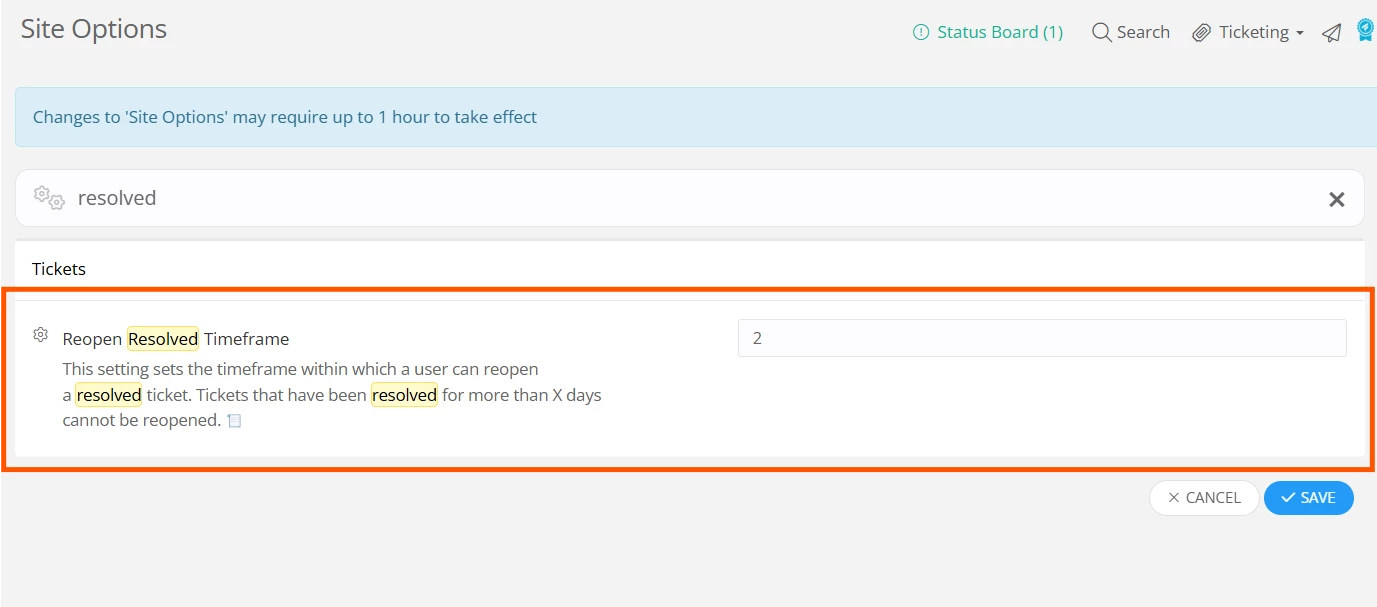
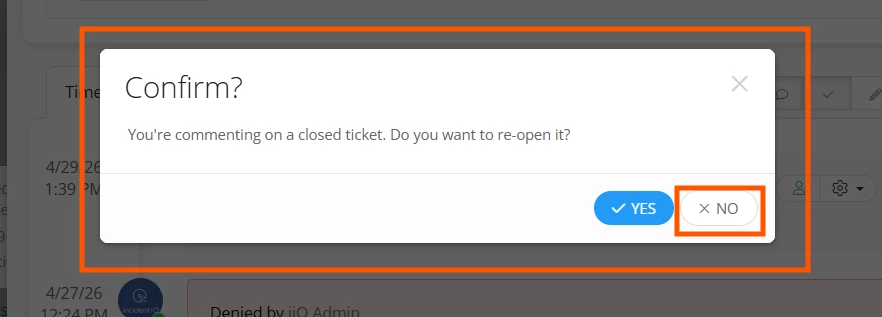
I hope you’re doing great! There is a site setting, Reopen Resolved Timeframe, which sets the timeframe within which a user can reopen a resolved ticket. You can choose the number of days within which the system asks the user whether they want to reopen the ticket or not, when they add a comment. So when an Agent adds a comment to a resolved ticket, a new window will pop-up which will ask the Agent if they would like to reopen the ticket. The Agent can click on “No”. 


Tickets that have been resolved for more than X days cannot be reopened. So when an agent adds a comment on resolved ticket that has been resolved for more than X days, the system won’t ask whether they would want to reopen the ticket and the ticket will stay closed. I’ll attach a few screenshots for your reference.


I hope this helps! If you have any questions or concerns, please let me know. May you have a great day ahead!


Regards,

Jas

View original

3 replies

JDhanjal_iiQ
Forum|alt.badge.img+6
  • Employee
  • Answer
  • Apr 29, 2026 5:53 PM UTC

Hi ​@MEstrada 61763a6 walton ,


I hope you’re doing great! There is a site setting, Reopen Resolved Timeframe, which sets the timeframe within which a user can reopen a resolved ticket. You can choose the number of days within which the system asks the user whether they want to reopen the ticket or not, when they add a comment. So when an Agent adds a comment to a resolved ticket, a new window will pop-up which will ask the Agent if they would like to reopen the ticket. The Agent can click on “No”. 


Tickets that have been resolved for more than X days cannot be reopened. So when an agent adds a comment on resolved ticket that has been resolved for more than X days, the system won’t ask whether they would want to reopen the ticket and the ticket will stay closed. I’ll attach a few screenshots for your reference.


I hope this helps! If you have any questions or concerns, please let me know. May you have a great day ahead!


Regards,

Jas


Forum|alt.badge.img+8
  • Participant
  • May 19, 2026 12:39 PM UTC

First of all the wording on the pop up is confusing. I’ve heard numerous times from end users about it. 

  1. If I push No, would a comment be posted?
  2. Am I not supposed to comment on a ticket that is closed?
  3. Do I want to re-open WHAT? A comment or a ticket?

Those are the kinds of questions I am getting from my users, the wording should be changed on the pop up to make it more user friendly and the default YES or NO, should be given to us as a choice through Site Options. My company wants NO as a default, but I can’t change it. 


Also, I assume putting a 0 into the field would make a pop up appear if a closed ticket receives a comment < 1 day (meaning as soon as the ticket is closed, commenting on the ticket would show the prompt?)


Kathryn Carter
Forum|alt.badge.img+18

​@akorkishko I went ahead and opened your idea you submitted about this thread! Totally agree with you on the wording.