Question

Rule to Resolve Event Reservation Tickets on Multi-Day Events

  • Jul 8, 2026 3:44 PM UTC
  • 10 replies
  • 60 views

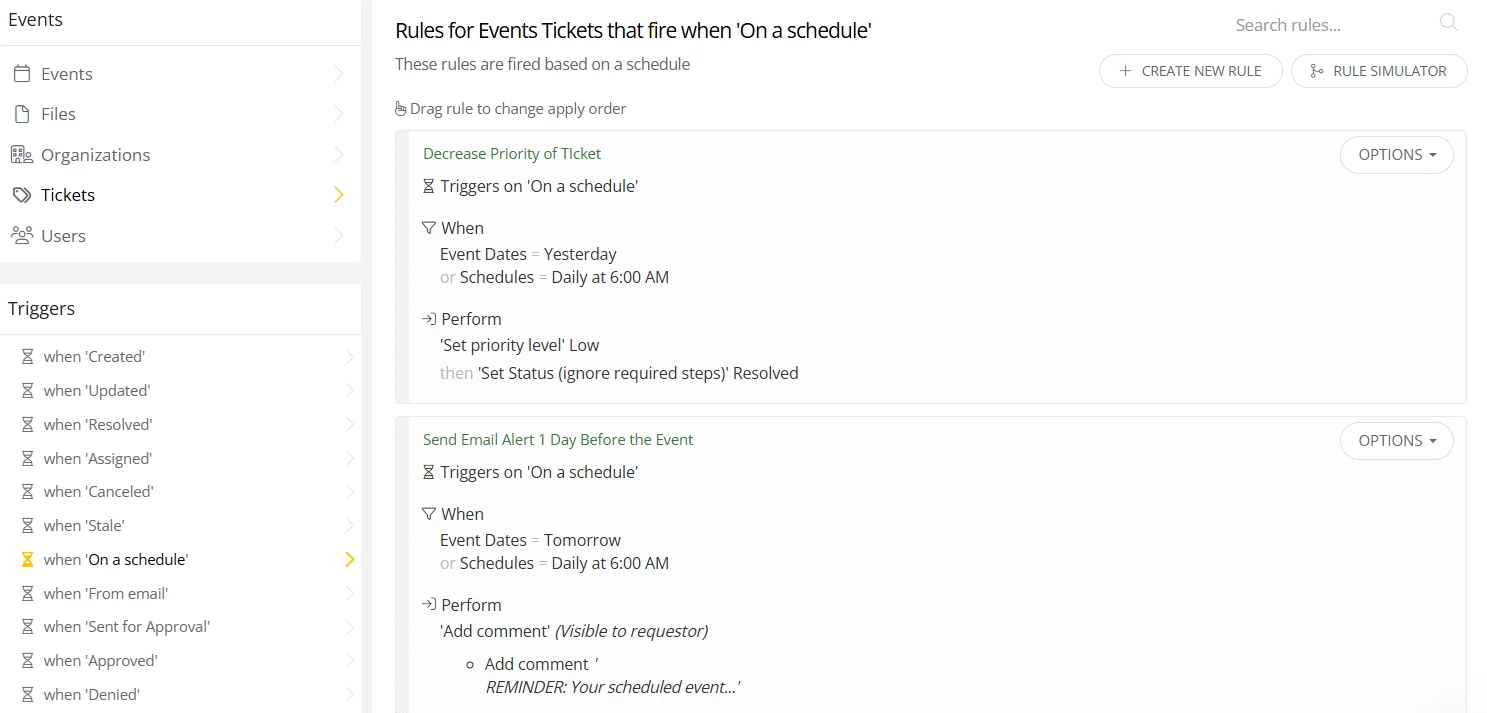
I have a rule that will run on a schedule (daily) to check whether an event occurred yesterday and then it will resolve that ticket. My problem is that for multi-date events, I do not want to resolve the main ticket because it will then resolve subsequent events that haven’t happened yet.

I can create a custom field for multi-day events and have users select it when creating the event reservation and then exclude that from the rule but then it would require manual intervention to close out the ticket when the final event date is reached. I’m wondering if anyone has found a way to automate this process for these types of events?


10 replies

Kathryn Carter
Forum|alt.badge.img+18

​@CCamara 837a122 gnbvt Thank you for submitting your question to our community! 😄 

Could you post a screenshot of what your rule currently looks like? I am brainstorming we could add a second rule to catch those extra tickets. 


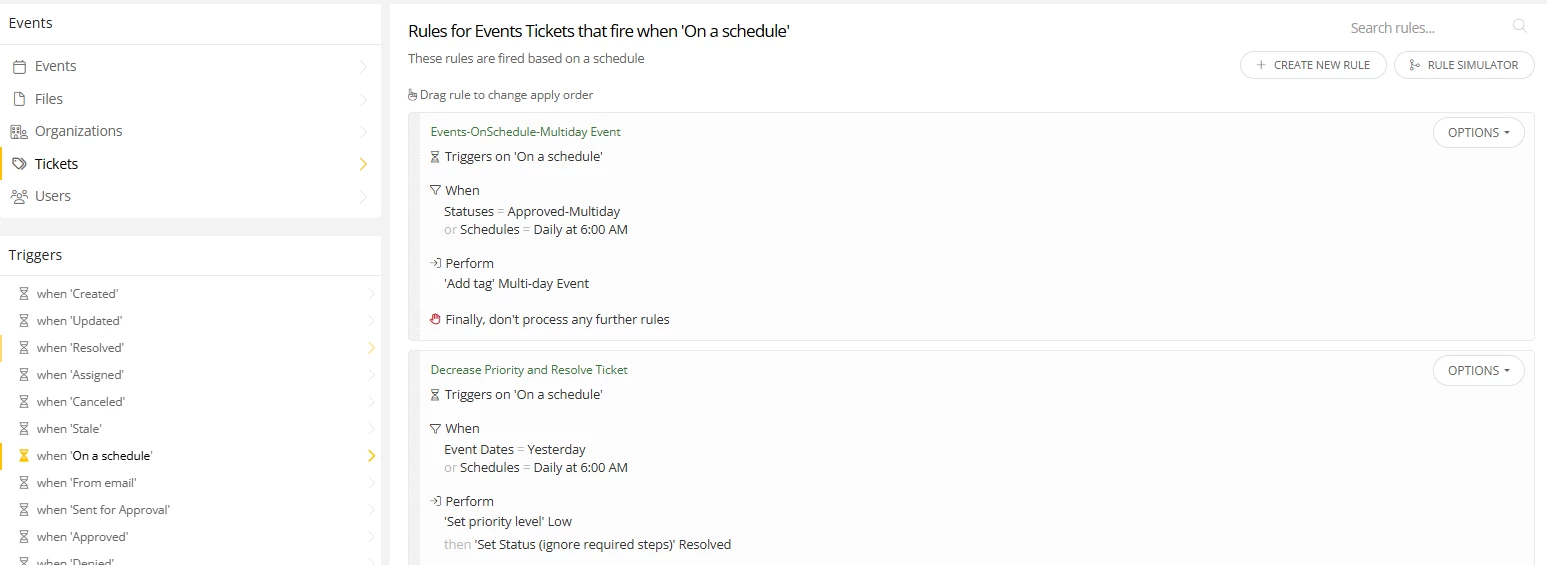
Hi ​@Kathryn Carter, here is the screenshot….I added in the multiday filter I described in my previous post and it did not go as planned haha. It ended up resolving every ticket for events. I was able to restore them all but it generated a ton of notifications and I had to confess my error.


Kathryn Carter
Forum|alt.badge.img+18

​@CCamara 837a122 gnbvt Oh no! Glad you were able to restore those! Another follow up question - do you have events that are super long or are these multi event days typically less than a week? I ask because we can create a rule that closes the ticket a certain of number of days after the event. With that if its typically like a 4 day event, you could set that to close after 4 days (which would close all of those tickets). 

My thought is to create a custom ticket status (like multi day event series) so that you can exclude that ticket status from being closed. 


Kathryn Carter
Forum|alt.badge.img+18

Additionally, check out this idea:

I think this would also help with this use case. 


Hi ​@Kathryn Carter, sometimes we have events that are grouped together back to back but usually it is a weekly or multiday event spread out over weeks or months. I like the custom ticket status, when our admin approves the event, she could then change the status to “Approved-Multi-day” for instance so it doesn’t confuse the requester. My thought is to put that first in the rules queue and check the box not to process any other rules. If I attempt to put it in my current rule above it doesn’t behave because then it must check statuses. I hope if I run them on the same schedule I get the results I expect. 


Kathryn Carter
Forum|alt.badge.img+18

​@CCamara 837a122 gnbvt For your second rule, you will need to add the “excludes multi day tag” so that it will not fire on those multiple day events. 


HI Kathryn, I had tried that initially and it ended up resolving every ticket. 


Kathryn Carter
Forum|alt.badge.img+18

​@CCamara 837a122 gnbvt I followed up with one of our events specialist, and she recommends resolving the ticket as soon as the event is approved. This prevents open tickets from lingering unnecessarily, and you can continue to track the scheduled events directly via the calendar.


​@Kathryn Carter Wouldn’t this prevent the ticket owner from commenting if the event requires any changes?


Kathryn Carter
Forum|alt.badge.img+18

​@CCamara 837a122 gnbvt Not necessarily. The user can always log into iiQ & add a comment if need be unless you have the site option enabled that does not allow them to comment on a ticket after a certain number of days.