
Solved

Asset View Foldering

  • Apr 14, 2025 1:54 PM UTC
  • 3 replies
  • 99 views

Forum|alt.badge.img+2

I’m looking to clean up my options once I click on Assets.  Right now I have 14 views that list out every time I click.  This makes it so I have to slide/page down to get to the ‘Check In/Out’ option.  This is especially tedious to do on the mobile app.

Is there a way to create a folder system for my views so that I can group them and thus shrink the number of views on my top level?

Best answer by Layla Stone

​@PHolcombe 820bae5 everettsd 

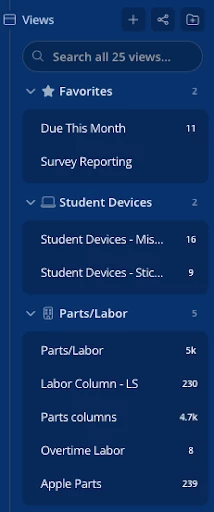
Great news! The answer to this is now yes! In the Views section of the left navigation, you can create your own folders with a custom name and icon to group your asset views however works best for you. 


View original

3 replies

EStapf_iiQ
Forum|alt.badge.img+14
  • Employee
  • Apr 14, 2025 2:05 PM UTC

​@PHolcombe 820bae5 everettsd Thanks for submitting your question! 

The answer to this one is: not yet!

As someone who had over 300 custom views as an iiQ Admin in my district, the ability to organize them into folders would have been incredible. Go to this one and add your comments (even though it is already in ‘Committed’)!


Layla Stone
Forum|alt.badge.img+6
  • Community Manager
  • Answer
  • Nov 2, 2026 3:09 PM UTC

​@PHolcombe 820bae5 everettsd 

Great news! The answer to this is now yes! In the Views section of the left navigation, you can create your own folders with a custom name and icon to group your asset views however works best for you. 


Forum|alt.badge.img+2

Thank you, this is great!