Solved

Does Incident IQ automatically match an asset's location to the assigned user's location?

  • January 26, 2022
  • 6 replies
  • 499 views

Reesa Azar
Forum|alt.badge.img+15

Is there a way to match asset location to assigned user location?

Best answer by JAdkins_iiQ

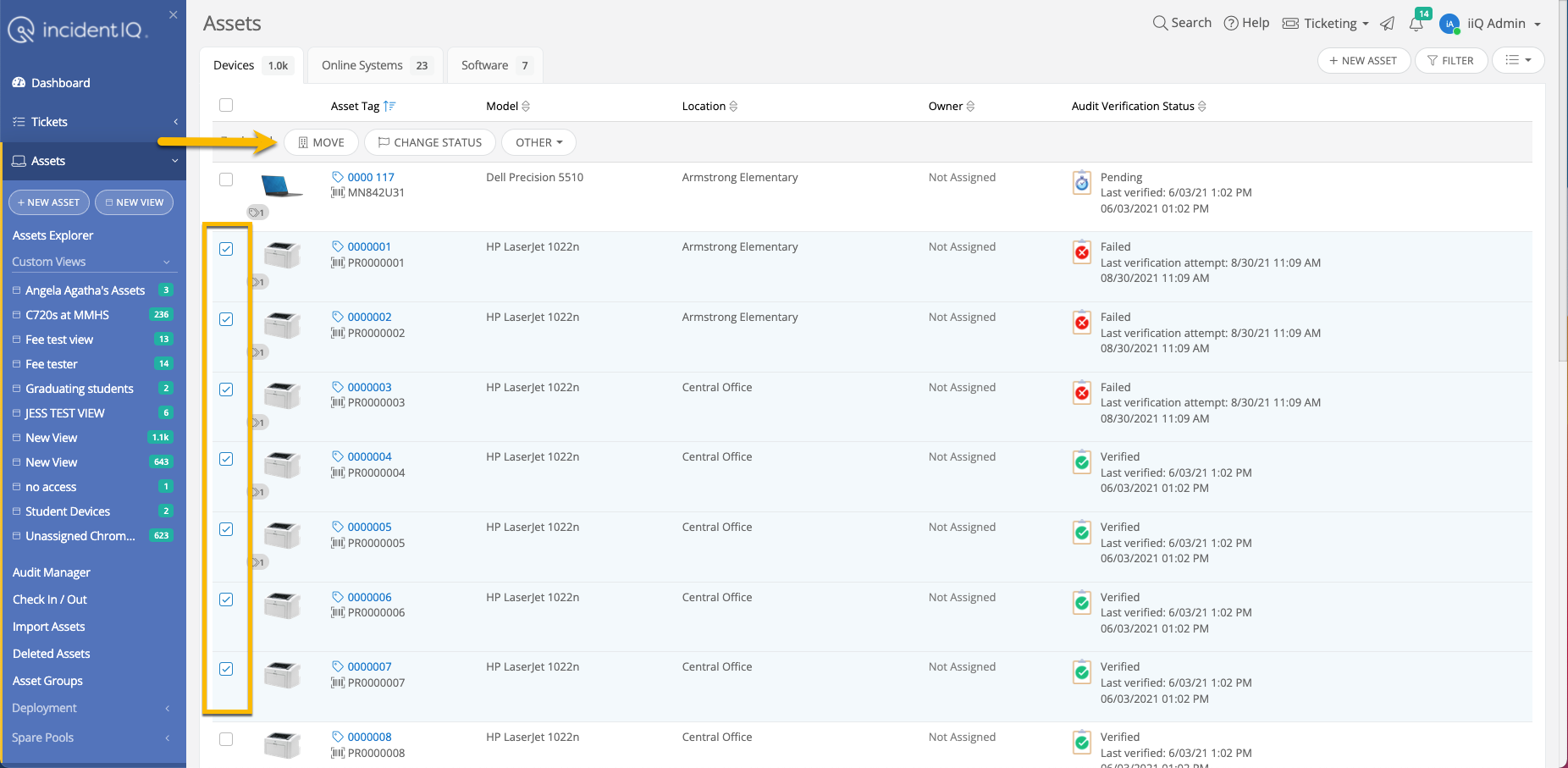
You can bulk update assets in the Asset Explorer tab. Select the assets that you want to bulk update, and a Move button will appear. Once you click Move, a window will pop up giving you the option to “Set asset location to the location of the assigned user.”


6 replies

JAdkins_iiQ
Forum|alt.badge.img+16
  • iiQ Community Manager
  • Answer
  • January 26, 2022

You can bulk update assets in the Asset Explorer tab. Select the assets that you want to bulk update, and a Move button will appear. Once you click Move, a window will pop up giving you the option to “Set asset location to the location of the assigned user.”



Deborah Prosser
Forum|alt.badge.img+17
  • iiQ Community Manager
  • January 26, 2022

Incident IQ does not automatically update the asset location to match the user’s location. However, administrators can enable this functionality within site options. One or both of the following two assets site options:

  • When User is Assigned an Asset: Update Asset to Match Owner's location
  • When User's Location Changes: Update Asset to Match Owner's location


Hannah Bailey
Forum|alt.badge.img+19
  • iiQ Community Manager
  • January 28, 2022

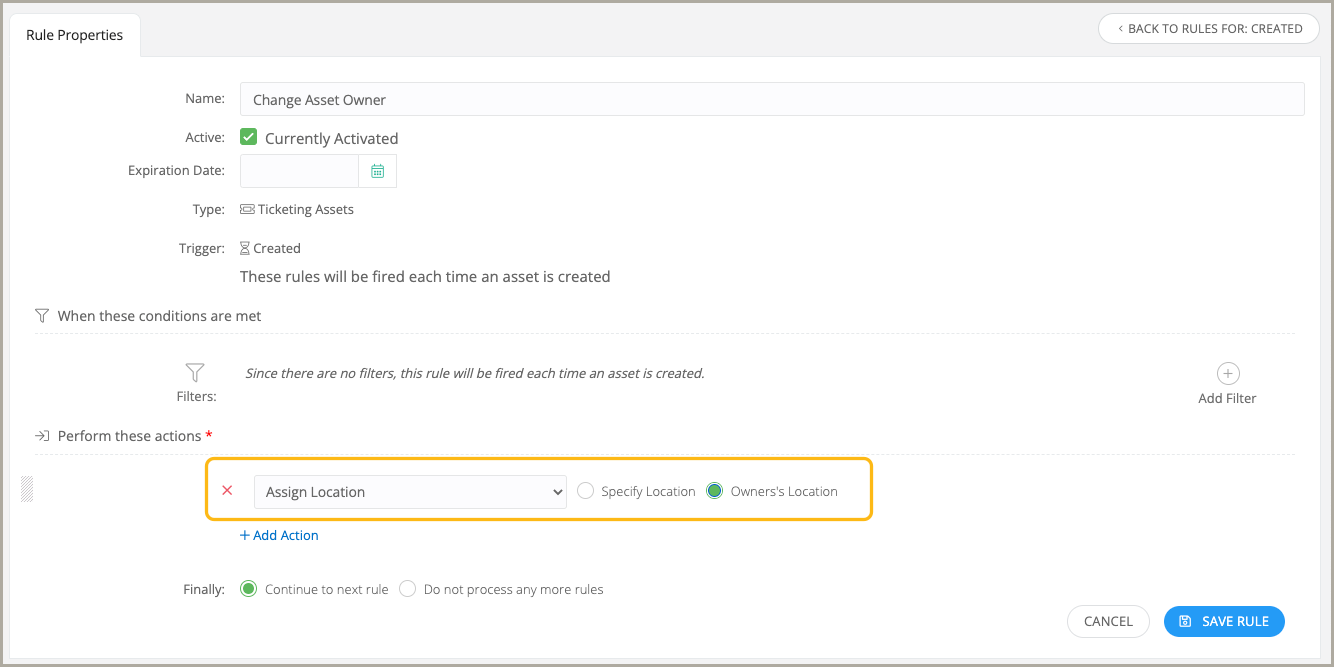
Also, you can run a rule to assign assets location to match the location of the assigned user. This is only available if your district has purchased iiQ Assets.

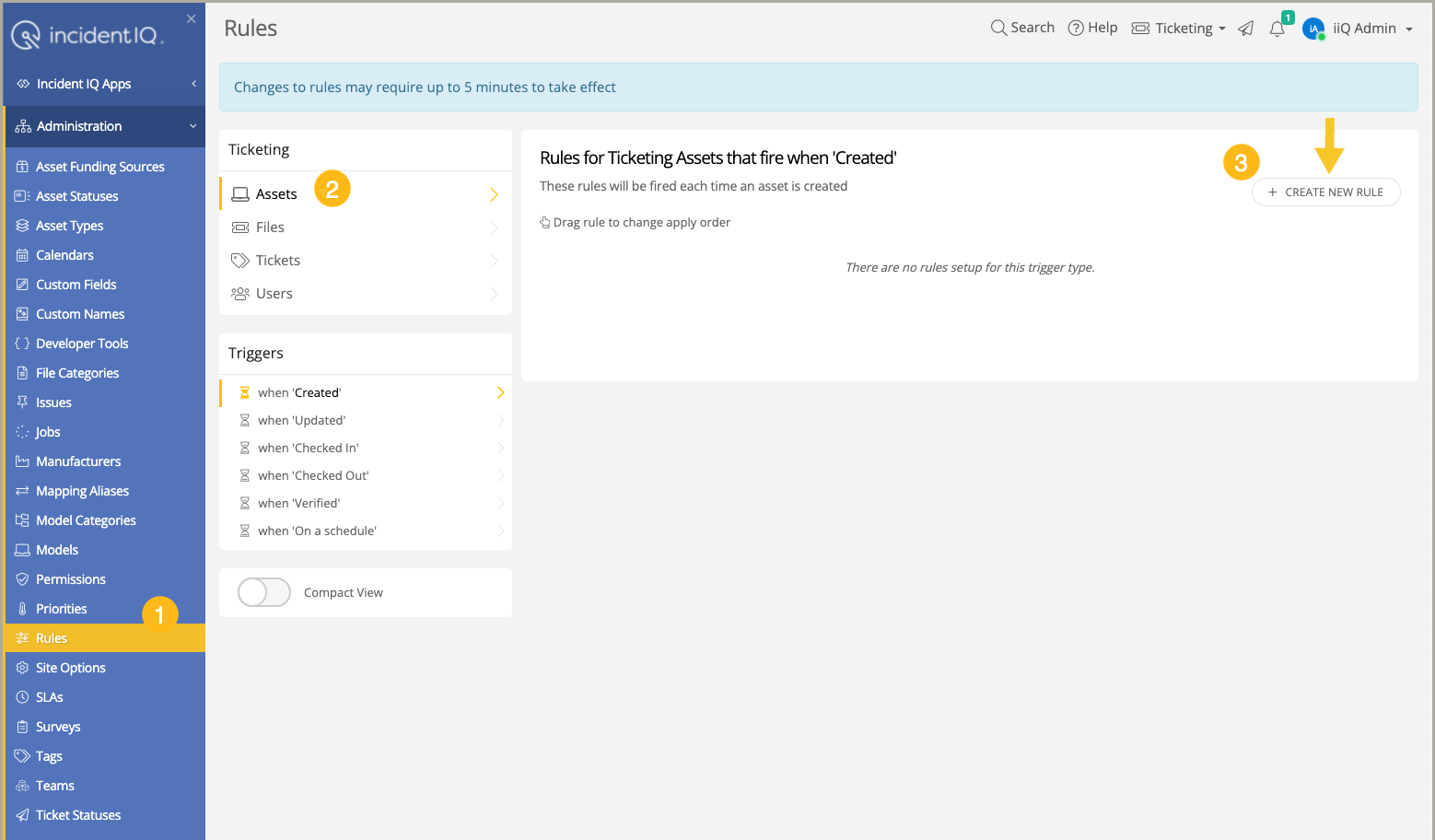
Under administration tab click Rules. Next under the ticketing section click on Assets. At the top right click the Create New Rule button.


Here you will create the rule and add the action to assign location to the owner’s location. 


RTSD26_AllynJ
Contributor
Forum|alt.badge.img+5
  • Contributor
  • September 26, 2026

Question. 

When we are updating based on user location, is there a way to grab the “room” as well. 
Preferably from homeroom field, which seems to be the only field we can reliably bulk update from one system or another… 


Kathryn Carter
Forum|alt.badge.img+18
  • Community Manager
  • September 28, 2026

​@RTSD26_AllynJ What system do the rooms live in? It will depend on your SIS/SSO. 


RTSD26_AllynJ
Contributor
Forum|alt.badge.img+5
  • Contributor
  • September 28, 2026

We have PowerSchool as our SIS, but I know its been expanded.customized a bit, so I don’t know for sure what datatable/field you are pulling that information from.  

I have added all of our rooms due to iIQ events and iIQ facilities as well.  

I have two parallel goals, for different reasons.  

Item 1 - I would love to have the room numbers along side the building location for all assets to make it easier on technicians to be able to reliably locate all assets.  

Item 2 - For our students, we would love to be able to automatically move the student device room information to their assigned classroom during end of year rollover.  

We are effectively still a 1:1 program, the device follows the student, we just store them in carts in the classroom versus them going home each day.  

Which somewhat connects back to that request about a master list of what values can be updated via which methods, so I can figure out what methods if any exist to automate some of these items.  Where we are unable to automate, we will turn it into a feature request.  :)