In Assets Explorer > Devices, is there a setting to allow asset tags to be sorted correctly numerically?
Current sorting is 1-9, example:
10,000 110,000 20,000 65,000 610,000 70,000 90,000 etc.
Rather, it would be helpful to sort having 10,000 [oldest asset] to 610,000 [newest asset].
Best answer by JDhanjal_iiQ
Hi @MHartman 6630b29 tsd ,
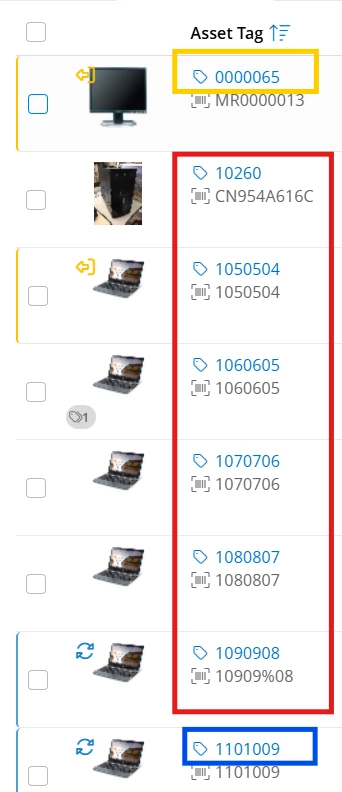
I hope you’re doing great! After further investigation, I found that when the assets are sorted by asset tag, the system sorts it by sorting each digit in the asset tag, not by the whole asset tag. For example, I selected the assets to sort by Asset Tag (Ascending). Currently, the asset tags are sorted by sorting each digit, so the assets that have “0” as the first digit in the asset tag are placed above in ascending order for example 0000065, assets that have “1” as the first digit are placed later and in ascending order for example, 10260, 1050504, 1060605, 1070706 and, so on. I’ll attach a screenshot for your reference.
If you would like to sort assets by the whole asset tag, that would be an enhancement request which you can share on our “Idea Exchange” page by clicking on the link below:
Our product team will review the idea and all the updates regarding this will be posted there. If you have any other questions or concerns, please let me know. I apologize for any inconvenience. May you have a great day ahead!
I hope you’re doing great! After further investigation, I found that when the assets are sorted by asset tag, the system sorts it by sorting each digit in the asset tag, not by the whole asset tag. For example, I selected the assets to sort by Asset Tag (Ascending). Currently, the asset tags are sorted by sorting each digit, so the assets that have “0” as the first digit in the asset tag are placed above in ascending order for example 0000065, assets that have “1” as the first digit are placed later and in ascending order for example, 10260, 1050504, 1060605, 1070706 and, so on. I’ll attach a screenshot for your reference.
If you would like to sort assets by the whole asset tag, that would be an enhancement request which you can share on our “Idea Exchange” page by clicking on the link below:
Our product team will review the idea and all the updates regarding this will be posted there. If you have any other questions or concerns, please let me know. I apologize for any inconvenience. May you have a great day ahead!