We have a user that likes to print out any tickets that she enters, to keep them in her records. When creating the PDF however, it doesn’t show that she attached any files in the activity listed.
Is there a way to customize what appears on the printed / PDF ticket?
Thanks,
Ricky Wallace
Enterprise Network Administrator
Information Technology Services
Santa Rosa County District Schools
Best answer by Layla Stone
@RickyWallace
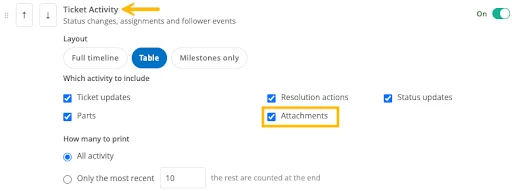
I want to update this thread about our new Print Layout Templates feature. Print Templates let you control which ticket sections appear on a printout or PDF. When creating a new print template, select the Attachments activity type in the Ticket Activity section; the printout will include a row line item noting which user added the file and the file name. Then make the template available to her role.
@RickyWallace - Currently that is not something that can be customized when creating a PDF for tickets. This would be a great suggestion for our Idea Exchange! 🙂 https://community.incidentiq.com/ideas
I want to update this thread about our new Print Layout Templates feature. Print Templates let you control which ticket sections appear on a printout or PDF. When creating a new print template, select the Attachments activity type in the Ticket Activity section; the printout will include a row line item noting which user added the file and the file name. Then make the template available to her role.