Solved

Filtering Issue Tickets if there is a Problem Ticket

  • June 22, 2026
  • 7 replies
  • 51 views

JThiess 3031b94 ecasd

Hi there, I am wondering if anybody has found a way to filter out tickets that are assigned to a problem ticket. We have a view for our “stale” tickets, and we are looking to exclude tickets that are part of a larger issue (since it may take more time to solve than most). This could (but doesn’t for our case) extend to things like SLA timers.

Best answer by EStapf_iiQ

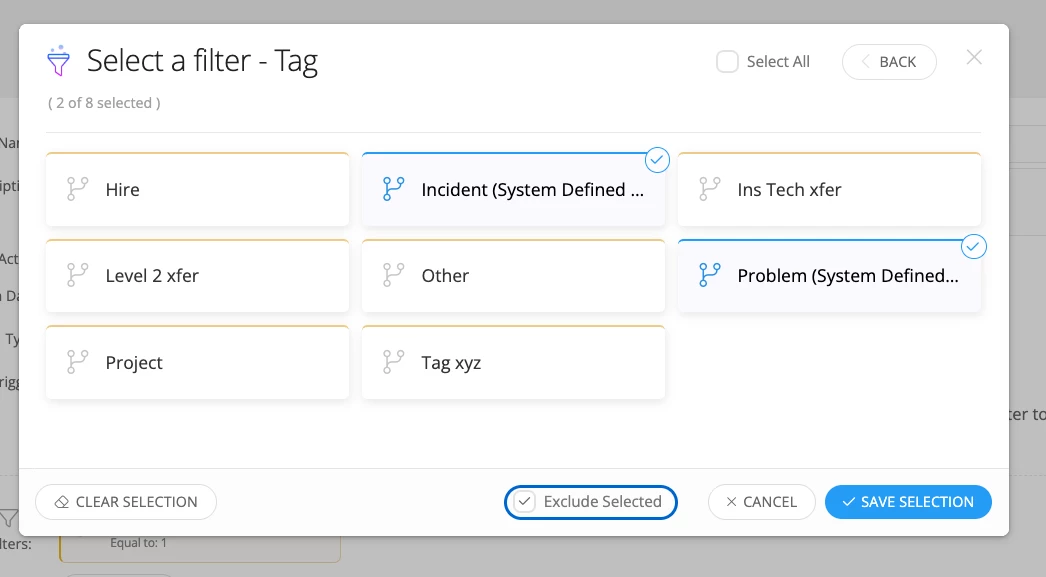
Hi ​@JThiess 3031b94 ecasd! Thanks for your question. I think the best way to achieve this is to add an additional conditional filter to your ‘When Stale’ rule that excludes tickets with the tags that are predefined as ‘Problem’ and ‘Incident’ with the workflow. 


Hope this helps!

7 replies

EStapf_iiQ
Forum|alt.badge.img+14
  • Employee
  • Answer
  • June 22, 2026

Hi ​@JThiess 3031b94 ecasd! Thanks for your question. I think the best way to achieve this is to add an additional conditional filter to your ‘When Stale’ rule that excludes tickets with the tags that are predefined as ‘Problem’ and ‘Incident’ with the workflow. 


Hope this helps!


RSeward_iiQ
Forum|alt.badge.img+6
  • Employee
  • June 22, 2026

Hi ​@JThiess 3031b94 ecasd! Thanks for your question. I would be happy to help.


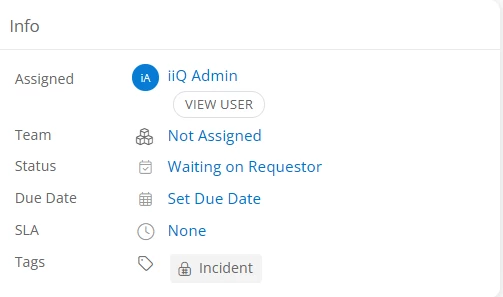
When a you associate tickets to a Problem Ticket, they get the tag of “Incident” and the Problem Ticket recives a tag of “Problem”.


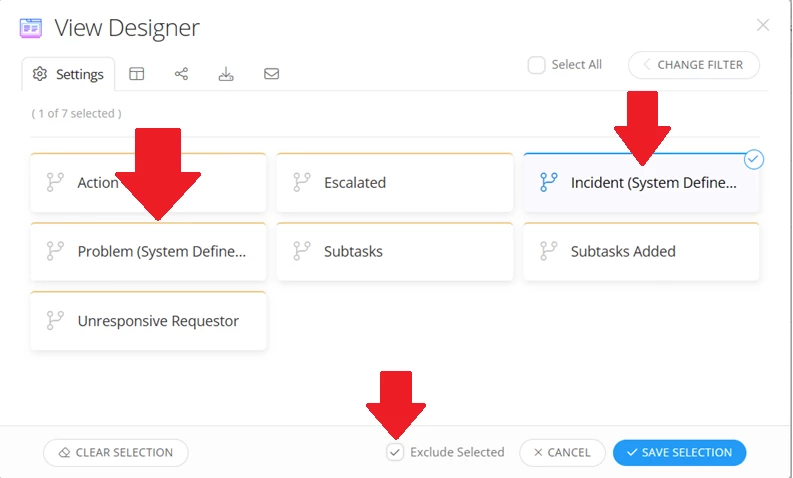
You should be able to add add a filter to the Stale View by going to Tag>Incident(System Defined) and Problem(System Defined). Then hit the Exclude check box. This will remove those tickets from the view. 


Let me know if that helps!


EStapf_iiQ
Forum|alt.badge.img+14
  • Employee
  • June 22, 2026

@RSeward_iiQ!!


JThiess 3031b94 ecasd

Hi ​@JThiess 3031b94 ecasd! Thanks for your question. I think the best way to achieve this is to add an additional conditional filter to your ‘When Stale’ rule that excludes tickets with the tags that are predefined as ‘Problem’ and ‘Incident’ with the workflow. 


Hope this helps!

Thank you! I feel silly now, we were tagging all tickets as “Incident” by default, so I thought that was applied to everything by default (It was actually a rule we had setup)


EStapf_iiQ
Forum|alt.badge.img+14
  • Employee
  • June 22, 2026

@JThiess 3031b94 ecasd 
NEVER feel silly! I like to say that there are just things we know, things we don’t know, and things we knew but forgot. We are always happy to help!


Forum|alt.badge.img+4
  • Observer
  • June 23, 2026

Would this also be helpful for tickets that are coming in from the Helpdesk that would be considered “spam email” or “advertisements from vendors” as well as responses to tickets (meaning it opens a new ticket instead of just opening up the old ticket with the reply back).

Hope this makes sense


EStapf_iiQ
Forum|alt.badge.img+14
  • Employee
  • June 23, 2026

Would this also be helpful for tickets that are coming in from the Helpdesk that would be considered “spam email” or “advertisements from vendors” as well as responses to tickets (meaning it opens a new ticket instead of just opening up the old ticket with the reply back).

Hope this makes sense

 ​@MBesnier This one is tricky, for sure! Rules for ‘When Sent from Email’ can be configured to help.

This article should point you in the right direction:

Please let us know if you have other questions!