Question

Gather Information FIRST

  • March 23, 2026
  • 2 replies
  • 51 views

Forum|alt.badge.img

Currently - our agents work tickets and use a resolution action called “Escalate to SysAdmin” to assign the ticket to our SysAdmin team for review. The team would like some baseline information gathered FIRST before accepting the ticket. Here is the template:

User: [Teacher Name / Username]
Hostname: [e.g., FCS-SerialNumber]
MAC Address: [00:00:00:00:00:00]
IP Address: [10.xx.xx.xx]
Attachments: [Screenshot of Error] & [Screen Recording of Glitch]

I do not see a way to “require” the template to be filled out prior to performing a resolution action such as “escalate to SysAdmin team” Please add this feature and we have several teams that would like the information gathered FIRST prior to escalation.

2 replies

Forum|alt.badge.img+3
  • Employee
  • March 23, 2026


Hi ​@MSimmons 9701ea2 forsyth 

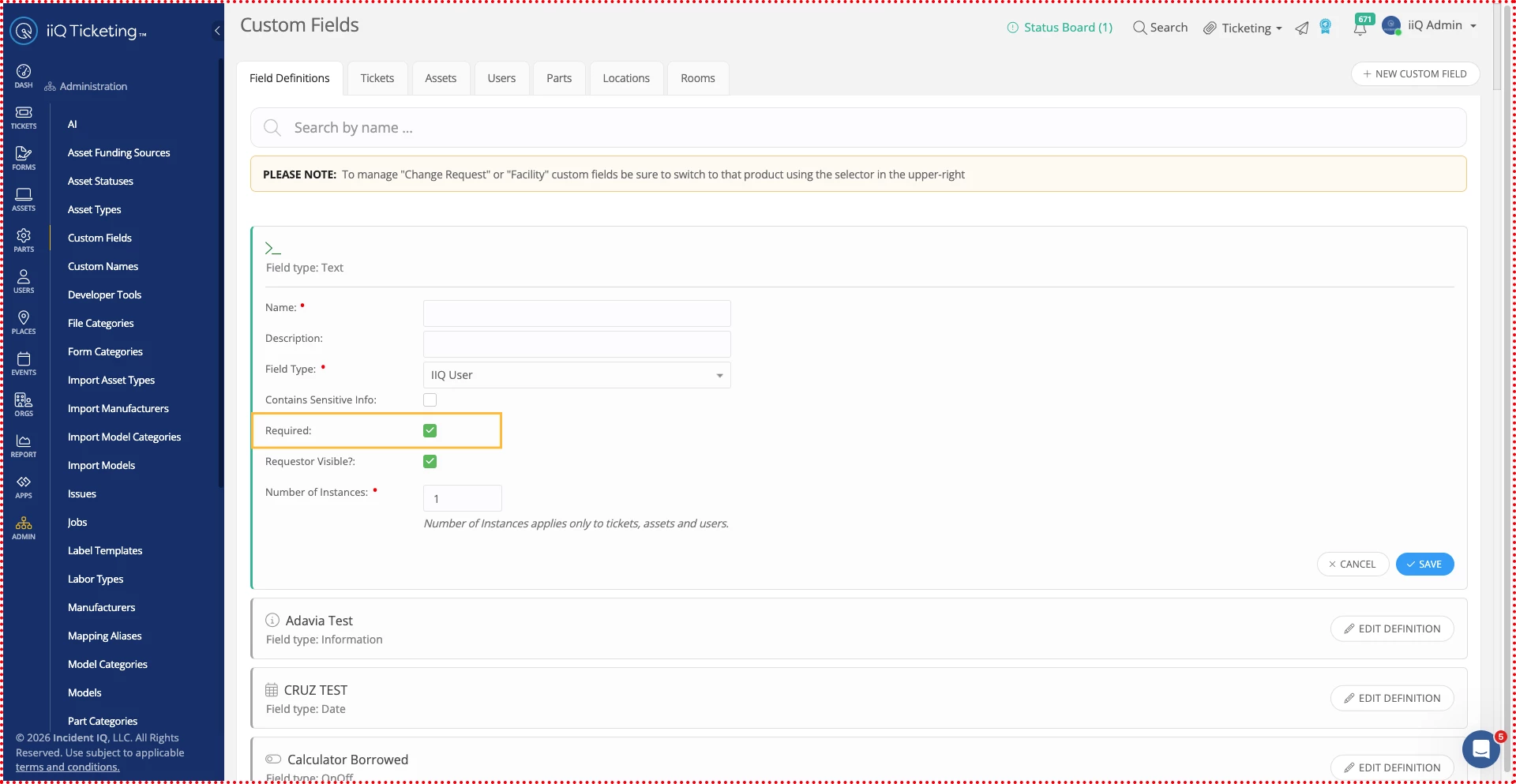
I hope you had a great weekend. Thank you for your question. To make the base line information as  required on ticket template you can use our custom field feature. Please navigate to Admin > Custom Field > Field Definition, where you can create the necessary fields and enable the Required checkbox. These fields will then appear as required on the template. I am also attaching a link to our community page, which provides a detailed guide to help you through the process. 
I hope this helps you find what you are looking for.
User =  IIQ User
Hostname = IIQ Asset
Mac Address = IIQ Model
IP Address = IP Address
Attachment = Image Upload
Screen Recording = Screen Recording

Community Link- 


Best Regards
Bandana ​​​​​​​


Forum|alt.badge.img+3

Hi ​@MSimmons 9701ea2 forsyth 

Thank you for reaching out! We definitely understand how crucial it is for your teams to have all the technical information in place before tickets are escalated.

Building on what ​@bverma_iiQ  mentioned regarding using Ticket Templates to standardize the initial intake, I wanted to suggest another alternative to level up that workflow using Subtasks and Subtask Groups from the Advanced Ticketing App.

While Ticket Templates are great for the initial submission, you can use the Rules Engine to ensure the SysAdmin requirements stay front-and-center during the escalation process itself:

  • Automated Checklists: You can create a "SysAdmin Escalation Requirements" Subtask Group. Instead of agents remembering to look at a template, you can set a rule: If Ticket Owner is changed to SysAdmin, then Apply Subtask Group.

  • Visible Audit Trail: While subtasks don't currently "hard-block" the escalation action, they provide an immediate, visible checklist in the subtask widget. If a SysAdmin receives a ticket and those subtasks aren't checked off, they have a clear justification to kick it back to the initial agent for more info.

  • Consistency: This ensures that every time a specific escalation occurs, the exact same set of technical requirements is presented to the agent.

You can find more information on how to setup subtasks in the article below. Please don’t hesitate to let us know if you need any additional information about the advanced ticketing app!