Solved

How do I change who the ticket is assigned? I need to move it along from myself to our tech department.

  • Apr 27, 2023 2:11 PM UTC
  • 6 replies
  • 398 views

Forum|alt.badge.img+2

I need to move the ticket along from myself to our tech department.  

Best answer by Cozmo03

Are you an agent in IIQ?
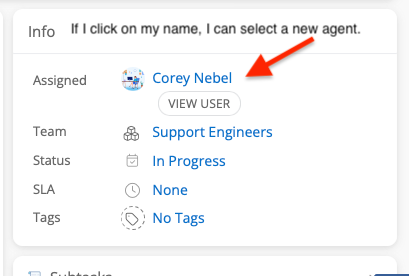
 

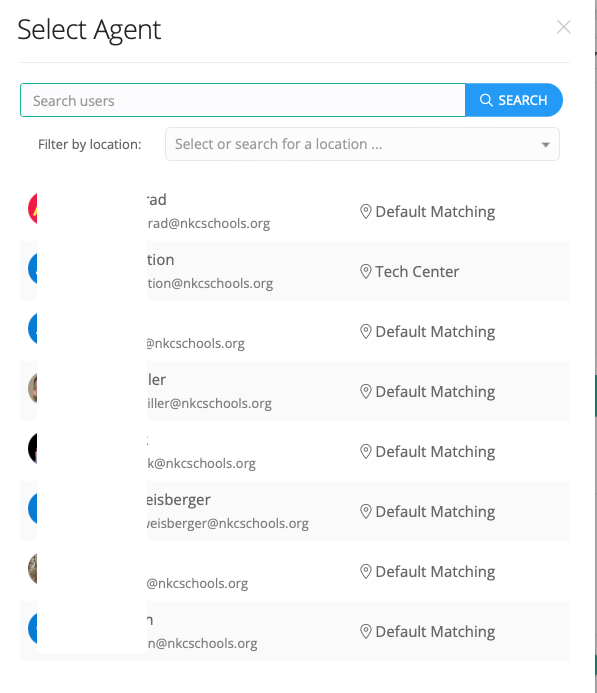
If you do not see these agents listed , you might not have the rights to change agents. Let me know what you are seeing. Can you send a screenshot?

View original

6 replies

Cozmo03
Participant
Forum|alt.badge.img+11
  • Participant
  • Apr 27, 2023 3:18 PM UTC

You should be able to click on the agent’s name in the upper right hand corner and select who it needs to go to. Have you tried that?


Forum|alt.badge.img+2

Thank you for your reply.  I do not see where it says agent.  I only see where it has Assigned and my name, but it does not allow me to change from here.  If I click on my name it just brings up my profile.


Cozmo03
Participant
Forum|alt.badge.img+11
  • Participant
  • Answer
  • Apr 27, 2023 6:19 PM UTC

Are you an agent in IIQ?


If you do not see these agents listed , you might not have the rights to change agents. Let me know what you are seeing. Can you send a screenshot?



Forum|alt.badge.img+2

Thank you for your help.  My tech guys resolved the issue, so I don’t think I can do anything with it now.  However, I did locate in the top, that I am an agent.  When one of my tech department comes back, I will ask them.  Thanks again.


Cozmo03
Participant
Forum|alt.badge.img+11
  • Participant
  • Apr 27, 2023 6:30 PM UTC

No problem, glad they were able to fix it.


Kathryn Carter
Forum|alt.badge.img+18

Thank you @Cozmo03 for jumping in to help @CDashoff 330130f udsd. I am glad to hear this has been sorted out! 😄