Our organizations user support assigns tickets to technicians by division. My division has changed; how do I unassign tickets currently assigned to me?

Solved
How to unassign tickets
 +1
Best answer by JDhanjal_iiQ
Hi
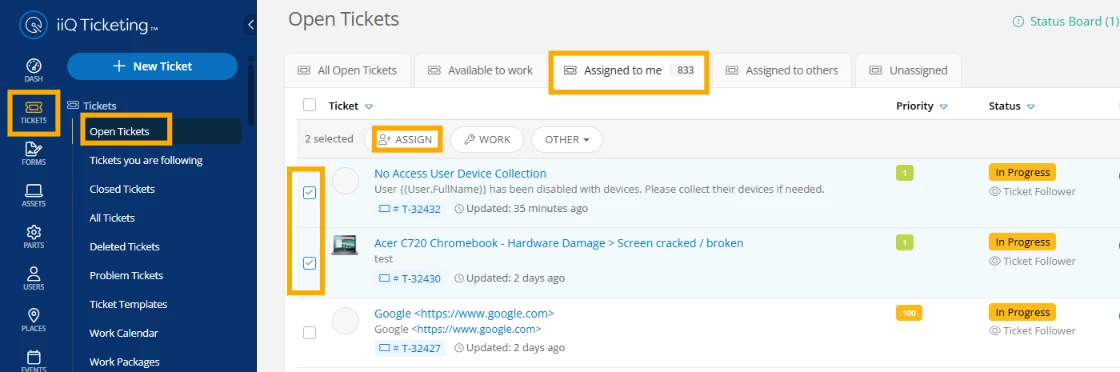
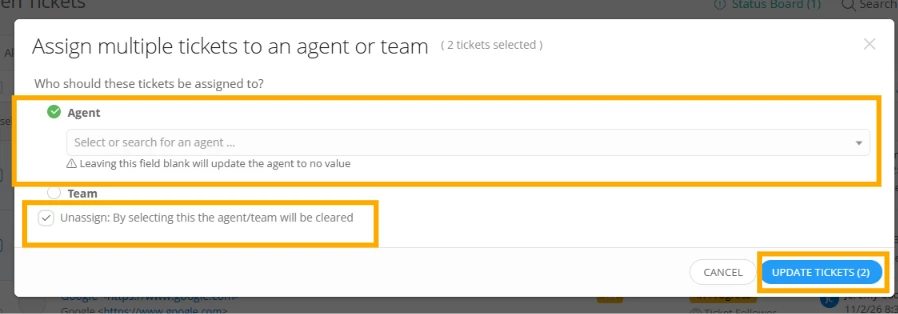
I hope you’re doing great! To unassign tickets assigned to you, you can navigate to Tickets > Open Tickets and click on the “Assigned to me” tab. Select the tickets you want to unassign by clicking on the check-box on the left-hand side. Then, click on “Assign” bulk action and select the “Unassign” option. I’ll share a few screenshots for your reference.
I hope this helps! If you have any questions or concerns, please let me know. May you have a great rest of your day!
Regards,
Jas





Enter your E-mail address. We'll send you an e-mail with instructions to reset your password.
