
Solved

Is it possible to reorder custom views? I'd like to have the ones I use most often at the top.

  • Feb 2, 2024 4:34 PM UTC
  • 4 replies
  • 198 views

STPittsinger
Forum|alt.badge.img+3


Best answer by Layla Stone

​@STPittsinger 

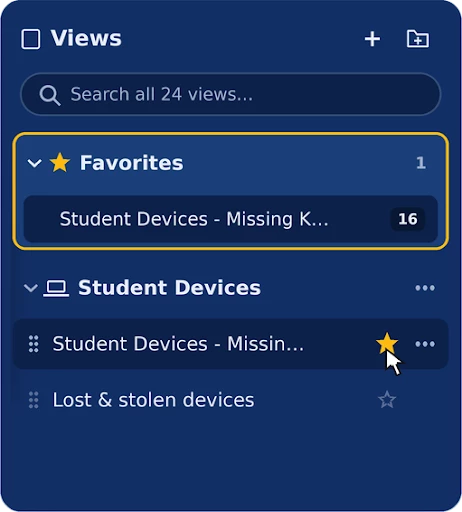
I wanted to update this thread to let you know that you can now star the views you use most to pin them in a Favorites folder at the very top of the Views section with our latest enhancement for Custom View Organization. You can also drag views into whatever order you like using the grip handle on the left side of each view, and create your own folders to group related views together.  
 

View original

4 replies

Erica
Contributor
Forum|alt.badge.img+10
  • Contributor
  • Feb 2, 2024 4:40 PM UTC

@STPittsinger I know this has been a popular ask of many other districts, but to my knowledge, we cannot currently re-order or arrange our custom views. Here is an idea you can vote for from Idea Exchange: Drag to Organize Custom Views | Community (incidentiq.com)! There is also a link on that page to vote for the ability to add folders to views as well! These updates would be so helpful!


bclark
Mentor
Forum|alt.badge.img+14
  • Mentor
  • Feb 2, 2024 4:46 PM UTC

I put a number or a symbol in front of mine to move them to the top since it’s alphabetical. I’d prefer a true manual re-arrange. But for now that works. 


STPittsinger
Forum|alt.badge.img+3
  • Author
  • Observer
  • Feb 2, 2024 5:36 PM UTC

I put a number or a symbol in front of mine to move them to the top since it’s alphabetical. I’d prefer a true manual re-arrange. But for now that works. 


Thank you very much.  This worked for me.


Layla Stone
Forum|alt.badge.img+6
  • Community Manager
  • Answer
  • Nov 2, 2026 3:10 PM UTC

​@STPittsinger 

I wanted to update this thread to let you know that you can now star the views you use most to pin them in a Favorites folder at the very top of the Views section with our latest enhancement for Custom View Organization. You can also drag views into whatever order you like using the grip handle on the left side of each view, and create your own folders to group related views together.