
Solved

Print/Save ticket - private comments

  • Sep 28, 2026 7:30 PM UTC
  • 2 replies
  • 22 views

Forum|alt.badge.img+12

Sometimes we need to print/save a ticket to discuss with the Requestor.
But, as far as I can tell, there is no way to exclude private comments.

Am I correct?

Should there be a “Requestor version” and a “Complete version” of the print/save?

Best answer by Layla Stone

​@jo.cpa 

I want to update this thread about our new Print Layout Templates feature. Print Templates let you control which ticket sections appear on a printout or PDF. To keep internal (hidden) comments from appearing on your printouts, you can create a custom print layout template and leave internal comments turned off. Only comments visible to the requestor will be shown.
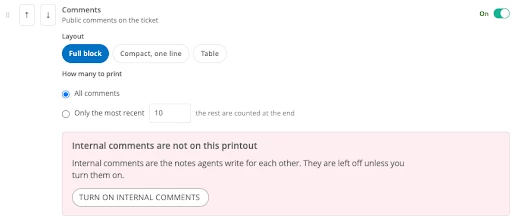
Learn more about this feature here.

 

View original

2 replies

JDhanjal_iiQ
Forum|alt.badge.img+6

Hi ​@jo.cpa ,


I hole you’re doing great! Yes, you’re correct. After testing, I can confirm that the non-visible comments also appear when a ticket is saved and currently, there is no option to save a ticket excluding the private comments in it. This would be an enhancement request which you can share on our Idea Exchange page by clicking on the link below:


 https://community.incidentiq.com/ideas


All the updates regarding the idea will be posted there. If you have any other questions or concerns, please let me know. May you have a great rest of your day!


Regards, 

Jas


Layla Stone
Forum|alt.badge.img+6
  • Community Manager
  • Answer
  • Nov 2, 2026 2:35 PM UTC

​@jo.cpa 

I want to update this thread about our new Print Layout Templates feature. Print Templates let you control which ticket sections appear on a printout or PDF. To keep internal (hidden) comments from appearing on your printouts, you can create a custom print layout template and leave internal comments turned off. Only comments visible to the requestor will be shown.

Learn more about this feature here.