
Question

Faculty Vs Staff

  • April 9, 2024
  • 9 replies
  • 447 views

Forum|alt.badge.img+3

What’s the difference?

9 replies

DHenry
Participant
Forum|alt.badge.img+6
  • Participant
  • April 9, 2024

I believe that “Faculty” is typically teachers, admins, etc. (people that need a degree/certification to do their job). Staff is any staff member that doesn’t fall into that category.

As far as iiQ goes, I don’t think there’s an actual difference unless you set up permission policies & visibility of different things to differentiate them.


ADeLacy
Participant
Forum|alt.badge.img+10
  • Participant
  • April 9, 2024

I agree, with @DHenry overall. You just need to set the permissions as you see fit for each group but they can be anyone you want.


TAnders
Specialist
Forum|alt.badge.img+16
  • Specialist
  • April 9, 2024

We use Faculty for our staff that we want to give a little more access to IIQ, for example our Facilities team only wants certain job titles to be able to enter tickets for their schools, so I map those titles to Faculty so I don’t have to do that with another custom staff policy that needs to be manually applied.


Kathryn Carter
Forum|alt.badge.img+18
  • Community Manager
  • April 10, 2024

@jmerwin Thank you for submitting your question to our community! 😄

This is a great discussion and something I also struggled with identifying the difference, especially within the product.  

Thank you @TAnders @ADeLacy 640001e ghsd and @DHenry for adding in your insight on this thread. 


KFugate 934d00 bullittk12
Forum|alt.badge.img+1

All staff came over as staff from Infinite Campus One Roster. Anyone have a quick solution as to how I’d make all my teachers and admins faculty? We have a lot that need access to check-in/check-out devices. Any info is appreciated! 


Kathryn Carter
Forum|alt.badge.img+18
  • Community Manager
  • August 14, 2024

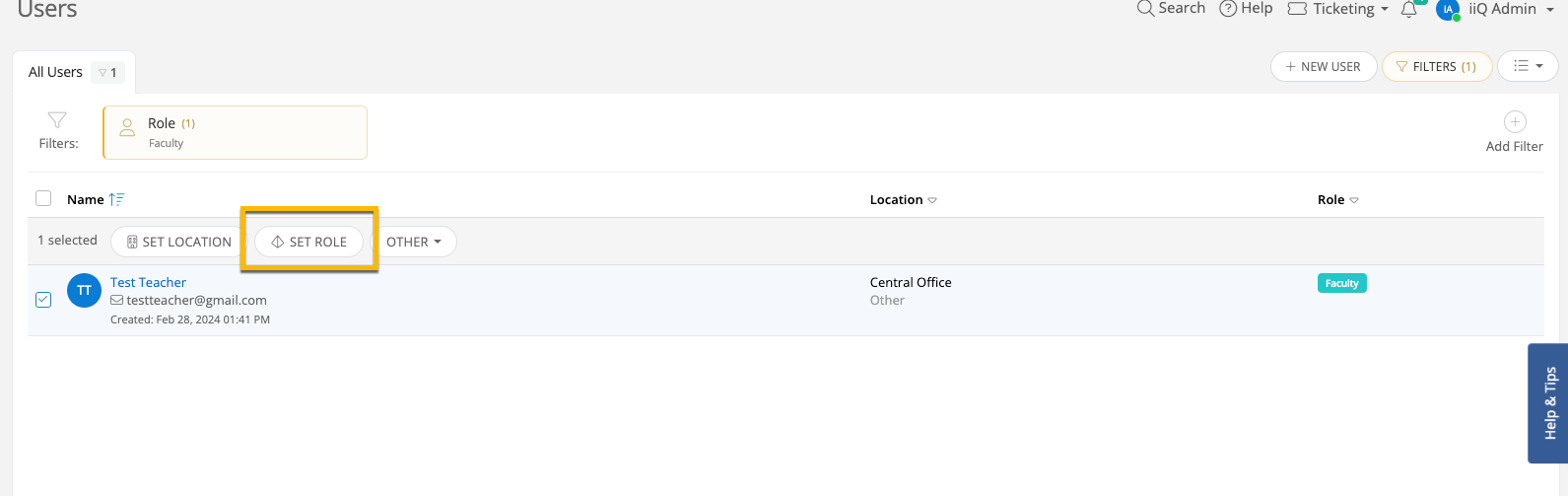
@KFugate 934d00 bullittk12 Are you on permissions v2? You could create a new permission policy and assign it to those folks who need that permission. 

Additionally, you can create a view with those users in it & set the role in bulk: 

Looks like I need to add some additional teachers to my testing site. 


Forum|alt.badge.img

Also confused by this.  Is there some way to have a filter for Faculty or Staff or whatever… that have a MyClassroom (students)?

I want to customize the Quick Tickets ONLY to those that have students/classroooms?


Kathryn Carter
Forum|alt.badge.img+18

@JOlinger 803e654 pca I can appreciate only assigning specific tickets for teacher’s dashboards that are with students! For this example, I would suggest adjusting the roles within your platform. What is your distinguishing factor for the roles of faculty (typically teachers) versus staff (support staff for teachers & other employees). This would ensure your teachers get exactly what they need. 😄 I hope this helps! 


VCollins_iiQ
Forum|alt.badge.img+6

Don’t forget, all. Included in your subscription is the ability to work with your assigned Customer Success Manager (CSM). They can help guide you through questions like this. There are many ways to implement.  The use of Roles, their permissions, and visibility of issue types and quick tickets when submitting an incident are a couple of examples. Every district is different.