
Solved

PreventProviderUpdates == true

  • September 8, 2026
  • 4 replies
  • 72 views

Forum|alt.badge.img+3

Where is this option enabled or disable in IIQ ? It seems to be disabled for most of our users 

Best answer by davecarty

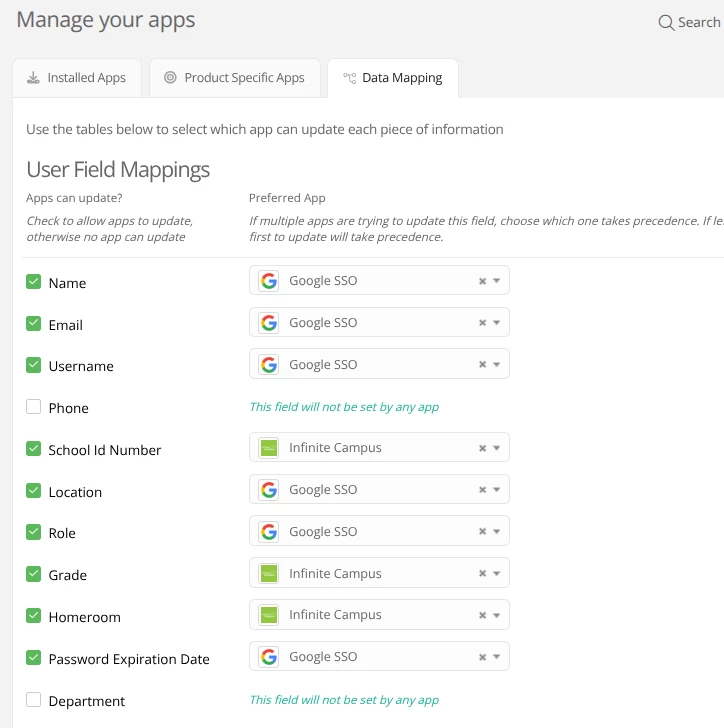
You can go into Apps and click on the Data Mapping tab. Then, you could uncheck which fields you don’t want sync’d until you get your data corrected.



View original

4 replies

davecarty
Mentor
Forum|alt.badge.img+12
  • Mentor
  • September 8, 2026

This is a guess, but it may be when you edit a user and click the lock button next to a field.


Forum|alt.badge.img+3

I am looking for a way to do that bulk. Is there a way to set it to off for all students. We have some corrupted data and i really don’t want to go through 3000 students 


davecarty
Mentor
Forum|alt.badge.img+12
  • Mentor
  • Answer
  • September 8, 2026

You can go into Apps and click on the Data Mapping tab. Then, you could uncheck which fields you don’t want sync’d until you get your data corrected.


Kathryn Carter
Forum|alt.badge.img+18

​@EPalmer 883df49 bvp Thank you for submitting your question to our community! 😄 

I hope ​@davecarty was able to answer your question!